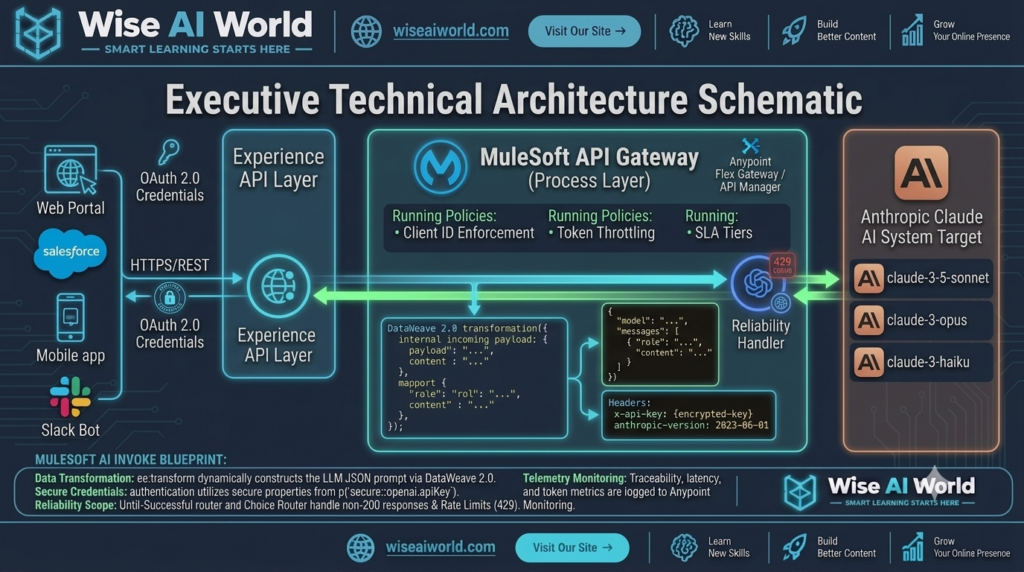
As enterprise organizations adopt multi-model AI strategies, Anthropic’s Claude model family—including Claude 3.5 Sonnet, Claude 3 Opus, and Claude 3 Haiku—has emerged as a preferred solution for complex reasoning, long-context document analysis, and sophisticated coding tasks. However, providing enterprise teams with direct, unmanaged access to Anthropic’s endpoints introduces governance liabilities: fragmented security key management, lack of rate-limiting, absence of unified telemetry, and missing PII protection.
To safely deploy Anthropic Claude across enterprise applications, integration teams must build a dedicated **API Gateway Proxy** using MuleSoft Anypoint Platform. By encapsulating Anthropic’s REST API behind an API-led integration layer, organizations enforce client authentication, token budgeting, request transformation, and audit logging while maintaining a decoupled architecture.
In this fourth guide of our Enterprise AI Integration series, we will build a complete, production-ready MuleSoft REST API Gateway for Anthropic Claude using Anypoint Studio, DataWeave 2.0, and Anypoint API Manager.
Architectural Overview: The MuleSoft Anthropic Gateway Pattern
Anthropic’s REST API differs from other provider endpoints in several key architectural ways. Understanding these differences is critical when designing your MuleSoft Process and System API layers.
Key Technical Requirements for Anthropic Integration
- Custom API Key Header (
x-api-key): Unlike standard Bearer token APIs, Anthropic requires authentication credentials to be passed in a dedicatedx-api-keyHTTP header. - Version Header Specification (
anthropic-version): Every inbound request must include an explicit API version header (e.g.,anthropic-version: 2023-06-01) to guarantee contract stability. - Top-Level System Prompt Parameter: Unlike OpenAI where system instructions live inside the
messagesarray, Anthropic isolates system instructions into a dedicated top-levelsystemstring parameter. - Mandatory
max_tokensField: Anthropic’s Messages API enforcesmax_tokensas a required top-level integer in every request payload.
Comparing AI Provider Endpoint Specifications
When engineering multi-model gateway architectures, integration developers must map provider-specific payload expectations accurately inside DataWeave:
| Feature Dimension | Anthropic Claude Messages API | OpenAI Chat Completions API |
|---|---|---|
| Target Endpoint | POST https://api.anthropic.com/v1/messages | POST https://api.openai.com/v1/chat/completions |
| Auth Header | x-api-key: [YOUR_API_KEY] | Authorization: Bearer [YOUR_API_KEY] |
| Required Version Header | anthropic-version: 2023-06-01 | N/A (Optional organization headers) |
| System Prompt Placement | Top-level key: "system": "..." | Inside messages array: {"role": "system", ...} |
| Token Output Requirement | max_tokens (Mandatory) | max_tokens (Optional) |
Step-by-Step Gateway Implementation
1. DataWeave 2.0 Payload Transformation Pipeline
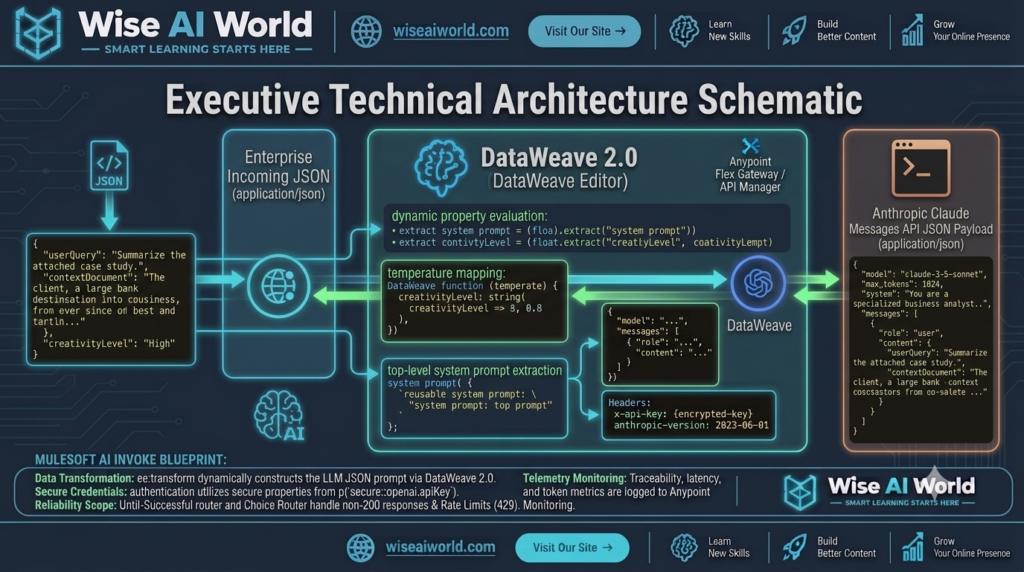
%dw 2.0
output application/json
var rawInput = payload.inputText default ""
var systemInstruction = "You are an enterprise AI document analyst. Analyze the input text rigorously and extract structured insights."
---
{
  "model": payload.modelChoice default "claude-3-5-sonnet-20240620",
  "max_tokens": payload.maxTokens default 1024,
  "temperature": payload.temperature default 0.2,
  "system": systemInstruction,
  "messages": [
    {
      "role": "user",
      "content": rawInput
    }
  ]
}
2. Parsing Anthropic’s Response Payload
Anthropic returns generated text inside a content array containing typed objects (e.g., type: "text"). The following DataWeave script parses the response safely and extracts execution usage metrics:
%dw 2.0
output application/json
var textBlocks = payload.content filter (item) -> item.'type' == "text"
---
{
  "status": "SUCCESS",
  "provider": "Anthropic",
  "modelUsed": payload.model,
  "generatedResponse": textBlocks[0].text default "",
  "usageMetrics": {
    "inputTokens": payload.usage.input_tokens,
    "outputTokens": payload.usage.output_tokens,
    "totalTokens": (payload.usage.input_tokens default 0) + (payload.usage.output_tokens default 0)
  },
  "stopReason": payload.stop_reason,
  "timestamp": now()
}
Complete Production MuleSoft Application Code (XML)
Below is the complete, runnable MuleSoft XML flow configuration. It includes global secure configuration references, HTTP Request configurations targeting Anthropic, DataWeave transformations, and structured error propagation handling:
<?xml version="1.0" encoding="UTF-8"?>
<mule xmlns:http="http://www.mulesoft.org/schema/mule/http"
      xmlns:ee="http://www.mulesoft.org/schema/mule/ee/core"
      xmlns:secure-properties="http://www.mulesoft.org/schema/mule/secure-properties"
      xmlns="http://www.mulesoft.org/schema/mule/core"
      xmlns:doc="http://www.mulesoft.org/schema/mule/documentation"
      xmlns:xsi="http://www.w3.org/2001/XMLSchema-instance"
      xsi:schemaLocation="
        http://www.mulesoft.org/schema/mule/core http://www.mulesoft.org/schema/mule/core/current/mule.xsd
        http://www.mulesoft.org/schema/mule/http http://www.mulesoft.org/schema/mule/http/current/mule-http.xsd
        http://www.mulesoft.org/schema/mule/ee/core http://www.mulesoft.org/schema/mule/ee/core/current/mule-ee.xsd
        http://www.mulesoft.org/schema/mule/secure-properties http://www.mulesoft.org/schema/mule/secure-properties/current/mule-secure-properties.xsd">

    <!-- Global Configuration Declarations -->
    <http:listener-config name="Gateway_HTTP_Listener_Config" doc:name="HTTP Listener Configuration">
        <http:listener-connection host="0.0.0.0" port="8081" />
    </http:listener-config>

    <http:request-config name="Anthropic_Claude_Request_Config" doc:name="HTTP Request Configuration">
        <http:request-connection host="api.anthropic.com" port="443" protocol="HTTPS"/>
    </http:request-config>

    <!-- Primary Gateway Flow -->
    <flow name="anthropic-claude-api-gateway-flow" doc:id="d4e5f6a7-004">
        <http:listener config-ref="Gateway_HTTP_Listener_Config" path="/api/v1/ai/claude/analyze" doc:name="POST /api/v1/ai/claude/analyze"/>

        <logger level="INFO" message="#['Inbound request received for Claude Gateway. Model selected: ' ++ (payload.modelChoice default 'default')]" doc:name="Log Entry"/>

        <!-- DataWeave Transformation: Construct Anthropic Schema -->
        <ee:transform doc:name="Build Anthropic Messages Payload">
            <ee:message>
                <ee:set-payload><![CDATA[%dw 2.0
output application/json
---
{
  "model": payload.modelChoice default "claude-3-5-sonnet-20240620",
  "max_tokens": payload.maxTokens default 1024,
  "temperature": payload.temperature default 0.2,
  "system": "You are a professional enterprise analysis assistant. Provide clean, well-structured output.",
  "messages": [
    {
      "role": "user",
      "content": payload.inputText default ""
    }
  ]
}]]></ee:set-payload>
            </ee:message>
        </ee:transform>

        <!-- HTTPS Request to Anthropic Messages API -->
        <http:request method="POST" config-ref="Anthropic_Claude_Request_Config" path="/v1/messages" doc:name="Invoke Anthropic API">
            <http:headers><![CDATA[#[{
                "x-api-key"          : p('secure::anthropic.apiKey'),
                "anthropic-version"  : "2023-06-01",
                "Content-Type"       : "application/json"
            }]]></http:headers>
        </http:request>

        <!-- DataWeave Transformation: Format Response for Clients -->
        <ee:transform doc:name="Format Anthropic Response">
            <ee:message>
                <ee:set-payload><![CDATA[%dw 2.0
output application/json
var textContent = payload.content filter (item) -> item.'type' == "text"
---
{
  "status": "SUCCESS",
  "provider": "Anthropic",
  "model": payload.model,
  "result": textContent[0].text default "",
  "tokens": {
    "input": payload.usage.input_tokens,
    "output": payload.usage.output_tokens
  },
  "timestamp": now()
}]]></ee:set-payload>
            </ee:message>
        </ee:transform>

        <logger level="INFO" message="#['Successfully retrieved response from Claude. Output tokens: ' ++ payload.tokens.output]" doc:name="Log Success"/>

        <!-- Error Handling Blueprint -->
        <error-handler>
            <on-error-propagate type="HTTP:BAD_REQUEST" logException="true" doc:name="On 400 Bad Request">
                <ee:transform doc:name="Format Bad Request Error">
                    <ee:message>
                        <ee:set-payload><![CDATA[%dw 2.0
output application/json
---
{
  "status": "ERROR",
  "code": 400,
  "errorType": "INVALID_ANTHROPIC_PAYLOAD",
  "message": "The request payload failed Anthropic validation. Verify max_tokens and model parameters."
}]]></ee:set-payload>
                    </ee:message>
                </ee:transform>
            </on-error-propagate>
            <on-error-propagate type="HTTP:UNAUTHORIZED, HTTP:FORBIDDEN" logException="true" doc:name="On Auth Error">
                <ee:transform doc:name="Format Auth Error">
                    <ee:message>
                        <ee:set-payload><![CDATA[%dw 2.0
output application/json
---
{
  "status": "ERROR",
  "code": 401,
  "errorType": "AUTHENTICATION_FAILURE",
  "message": "Failed to authenticate with Anthropic API. Check x-api-key vault configuration."
}]]></ee:set-payload>
                    </ee:message>
                </ee:transform>
            </on-error-propagate>
        </error-handler>
    </flow>
</mule>
Enforcing Gateway Governance in Anypoint API Manager
Building the MuleSoft flow solves integration connectivity. To turn this flow into an enterprise-grade gateway, apply the following policies in Anypoint API Manager:
- Client ID Enforcement Policy: Requires consumer applications to present valid Client ID and Client Secret credentials before reaching the gateway, ensuring complete visibility into consumer usage.
- Rate Limiting & Token Throttling SLA Tiers: Establish SLA tiers (e.g., Bronze: 100 requests/min, Gold: 5,000 requests/min) to prevent unauthorized API spikes from exceeding your Anthropic organization limits.
- Header Injection / Removal Policy: Strip client-provided authentication headers before proxying requests upstream, injecting the secure
x-api-keycredential strictly within the private MuleSoft runtime.
Testing the Gateway Endpoint
Execute the following cURL command against your deployed MuleSoft gateway endpoint:
curl -X POST http://localhost:8081/api/v1/ai/claude/analyze \
  -H "Content-Type: application/json" \
  -d '{
    "modelChoice": "claude-3-5-sonnet-20240620",
    "maxTokens": 300,
    "inputText": "Analyze the potential risks of legacy point-to-point architecture when integrating generative AI in enterprise IT."
  }'
Sample Gateway JSON Response:
{
  "status": "SUCCESS",
  "provider": "Anthropic",
  "model": "claude-3-5-sonnet-20240620",
  "result": "Legacy point-to-point integration architectures introduce significant enterprise risks for AI workloads:\n1. Ungoverned API Key Exposure across multiple client applications.\n2. Lack of Centralized Rate Limiting and Token Cost Management.\n3. Tight Coupling causing systemic failure during provider outages.\n4. Compliance Gaps due to unmonitored PII transmissions.",
  "tokens": {
    "input": 42,
    "output": 78
  },
  "timestamp": "2026-10-15T10:30:00Z"
}

Manish Prakash Dubey is an AI educator and technology writer based in India. He founded WiseAIWorld to make artificial intelligence simple and practical for students, professionals, and beginners. His work focuses on AI basics, machine learning, deep learning, NLP, computer vision, and real-world AI tools.
