
As enterprise organizations move generative artificial intelligence from experimental pilots into mission-critical production environments, architectural stability becomes paramount. Connecting frontend web apps, mobile solutions, or corporate Slack bots directly to external Large Language Model (LLM) endpoints via ad-hoc microservices creates brittle, tightly coupled systems that fail under high load, lack governance, and incur uncontrolled operational costs.
To build scalable, maintainable, and secure AI solutions, enterprise architects rely on MuleSoft’s API-Led Connectivity methodology. By organizing microservices into a structured 3-tier hierarchy—Experience APIs, Process APIs, and System APIs—organizations decouple client channels from volatile AI vendor contracts and backend databases.
In this eighth guide of our Enterprise AI Integration series, we examine how to design a robust 3-tier API-led microservices architecture specifically optimized for Generative AI workloads, Retrieval-Augmented Generation (RAG) pipelines, and multi-model orchestration.
The Limitations of Point-to-Point AI Microservices
Traditional microservice architectures often connect individual business services directly to external SaaS platforms and AI endpoints. When applied to generative AI, this point-to-point pattern creates severe architectural debt:
- Tight Vendor Coupling: If every microservice implements custom HTTP calls to OpenAI, migrating to Anthropic Claude or deploying an in-house open-source model requires rewriting dozens of independent codebases.
- Duplicated Orchestration Logic: Logic for prompt templating, PII masking, token counting, and error retries gets repeatedly reimplemented across separate microservices.
- Uncontrolled Cascading Failures: If an AI provider experiences latency spikes or outages, dependent microservices hang indefinitely, crashing parent applications.
- Lack of Centralized Governance: Security teams cannot enforce consistent rate limiting, client authorization, or data loss prevention (DLP) policies across decentralized services.
Architectural Overview: The 3-Tier API-Led AI Blueprint
MuleSoft’s 3-tier architecture solves these challenges by separating integration concerns into distinct, reusable layers:
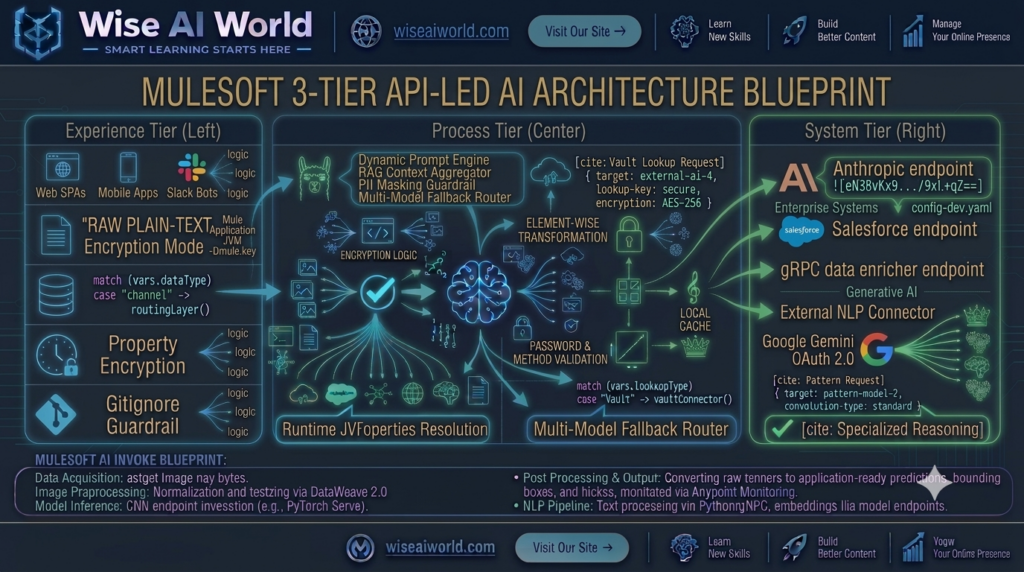
1. Experience APIs (Consumable Channel Layer)
Experience APIs expose purpose-built endpoints tailored to specific consumer channels (such as web portals, mobile native applications, customer support dashboards, or Slack bots). They handle channel-specific authentication (OAuth 2.0, JWT validation), payload formatting, and client-facing rate limiting via Anypoint API Manager.
2. Process APIs (The Intelligent Orchestration Core)
Process APIs encapsulate core business logic, data transformation, and AI orchestration. In an AI-powered microservices architecture, the Process API acts as the “brain” of the integration fabric:
- Orchestrates parallel calls to enterprise databases and Vector DBs to assemble RAG context.
- Executes DataWeave 2.0 prompt templating and automated PII scrubbing.
- Manages multi-model fallback logic (e.g., routing requests from OpenAI to Anthropic during provider outages).
3. System APIs (Encapsulated Backends & AI Providers)
System APIs unlock underlying enterprise systems of record (Salesforce, SAP, Workday, MySQL databases) and raw external AI provider endpoints (OpenAI GPT-4o, Anthropic Claude, Amazon Bedrock, Pinecone), isolating upstream flows from protocol changes or vendor updates.
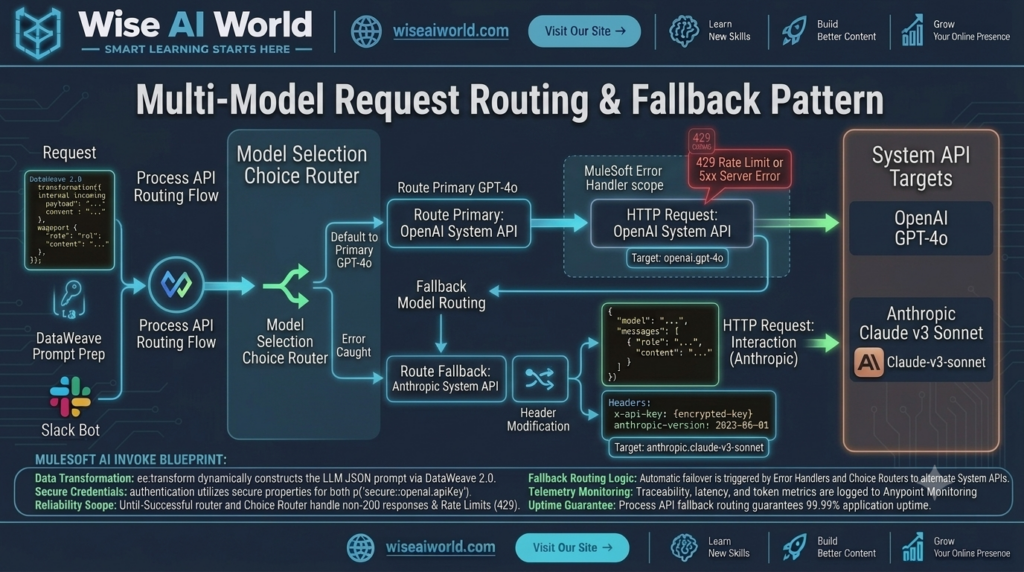
Designing a RAG-Enabled Process Microservice
One of the most common enterprise AI patterns is Retrieval-Augmented Generation (RAG), where LLMs are grounded using internal corporate documentation retrieved from a vector database.
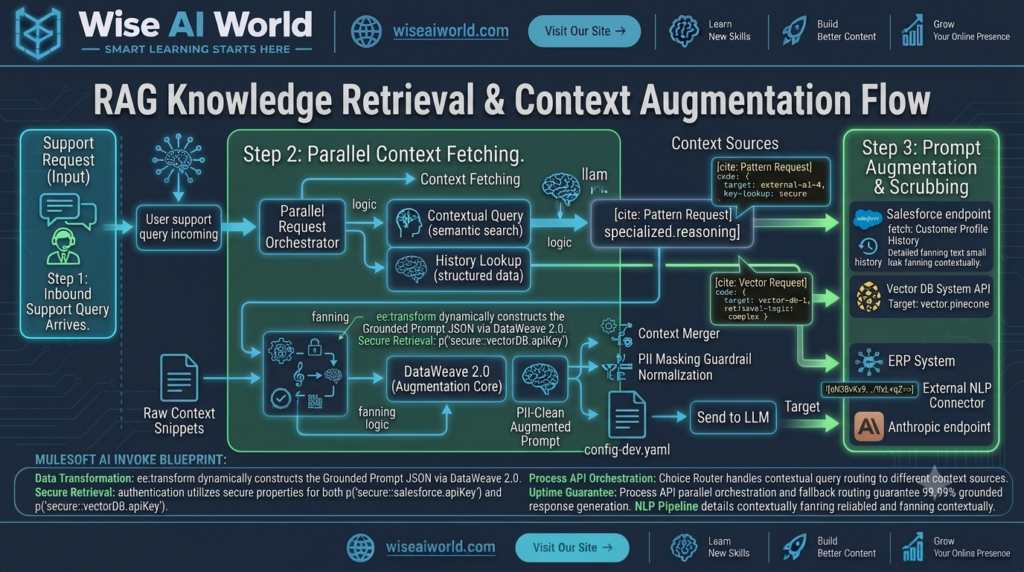
A well-designed Process API orchestrates this workflow asynchronously or via parallel scatter-gather scopes:
- Receive user query from the Experience API.
- Invoke **System API: Vector DB** to perform cosine similarity search for relevant knowledge snippets.
- Invoke **System API: Salesforce** to fetch live account history.
- Combine and scrub context inside DataWeave 2.0.
- Send the augmented prompt to **System API: LLM Provider** and return grounded results.
Reference Implementation: MuleSoft Process API XML Code
Below is a production-grade implementation of a MuleSoft Process API demonstrating modular 3-tier orchestration, secure property resolution, and structured error handling:
<?xml version="1.0" encoding="UTF-8"?>
<mule xmlns:http="http://www.mulesoft.org/schema/mule/http"
      xmlns:ee="http://www.mulesoft.org/schema/mule/ee/core"
      xmlns="http://www.mulesoft.org/schema/mule/core"
      xmlns:doc="http://www.mulesoft.org/schema/mule/documentation"
      xmlns:xsi="http://www.w3.org/2001/XMLSchema-instance"
      xsi:schemaLocation="
        http://www.mulesoft.org/schema/mule/core http://www.mulesoft.org/schema/mule/core/current/mule.xsd
        http://www.mulesoft.org/schema/mule/http http://www.mulesoft.org/schema/mule/http/current/mule-http.xsd
        http://www.mulesoft.org/schema/mule/ee/core http://www.mulesoft.org/schema/mule/ee/core/current/mule-ee.xsd">

    <!-- Process API Listener Configuration -->
    <http:listener-config name="Process_API_Listener_Config" doc:name="HTTP Listener Configuration">
        <http:listener-connection host="0.0.0.0" port="8082" />
    </http:listener-config>

    <!-- System API Request Configs -->
    <http:request-config name="Vector_DB_System_API_Config" doc:name="Vector DB System API Config">
        <http:request-connection host="sys-vectordb.internal.net" port="443" protocol="HTTPS"/>
    </http:request-config>

    <http:request-config name="LLM_System_API_Config" doc:name="LLM System API Config">
        <http:request-connection host="sys-llpprovider.internal.net" port="443" protocol="HTTPS"/>
    </http:request-config>

    <!-- Primary AI Process Flow -->
    <flow name="ai-rag-orchestration-process-flow" doc:id="h8i9j0k1-008">
        <http:listener config-ref="Process_API_Listener_Config" path="/api/v1/process/support/query" doc:name="POST /api/v1/process/support/query"/>

        <logger level="INFO" message="#['Initiating AI RAG Process Orchestration for session: ' ++ (payload.sessionId default 'unknown')]" doc:name="Log Start"/>

        <!-- Step 1: Parallel Scatter-Gather to Fetch Context and Embeddings -->
        <scatter-gather doc:name="Scatter-Gather Context Fetching">
            <route>
                <http:request method="POST" config-ref="Vector_DB_System_API_Config" path="/api/v1/vectors/search" doc:name="Fetch Vector Context">
                    <http:body><![CDATA[#[output application/json --- { "query": payload.userQuery }]]]></http:body>
                </http:request>
            </route>
            <route>
                <http:request method="GET" config-ref="Salesforce_System_API_Config" path="#['/api/v1/customers/' ++ payload.customerId]" doc:name="Fetch Customer Profile"/>
            </route>
        </scatter-gather>

        <!-- Step 2: DataWeave Prompt Construction & PII Scrubbing -->
        <ee:transform doc:name="Assemble Grounded Prompt">
            <ee:message>
                <ee:set-payload><![CDATA[%dw 2.0
output application/json
var vectorChunks = payload['0'].payload.matches default []
var customerProfile = payload['1'].payload default {}
var sanitizedQuery = payload.userQuery replace /([0-9]{4}-?){3}[0-9]{4}/ with "[REDACTED]"
---
{
  "model": "gpt-4o",
  "temperature": 0.2,
  "messages": [
    {
      "role": "system",
      "content": "You are an enterprise support bot. Use ONLY the provided context snippets and customer profile data."
    },
    {
      "role": "user",
      "content": "Customer Tier: " ++ (customerProfile.tier default "Standard") ++
                 "\nKnowledge Context:\n" ++ (vectorChunks joinBy "\n") ++
                 "\n\nQuestion: " ++ sanitizedQuery
    }
  ]
}]]></ee:set-payload>
            </ee:message>
        </ee:transform>

        <!-- Step 3: Invoke LLM System API -->
        <http:request method="POST" config-ref="LLM_System_API_Config" path="/api/v1/llm/complete" doc:name="Invoke LLM System API"/>

        <!-- Step 4: Format Final Process Response -->
        <ee:transform doc:name="Format Process Response">
            <ee:message>
                <ee:set-payload><![CDATA[%dw 2.0
output application/json
---
{
  "status": "SUCCESS",
  "data": {
    "answer": payload.generatedResponse,
    "tokensUsed": payload.usage.totalTokens
  },
  "timestamp": now()
}]]></ee:set-payload>
            </ee:message>
        </ee:transform>

        <!-- Robust Error Handling Blueprint -->
        <error-handler>
            <on-error-propagate type="HTTP:TIMEOUT, HTTP:TOO_MANY_REQUESTS" logException="true" doc:name="Handle Upstream AI Failure">
                <ee:transform doc:name="Format Fallback Response">
                    <ee:message>
                        <ee:set-payload><![CDATA[%dw 2.0
output application/json
---
{
  "status": "ERROR",
  "code": 503,
  "errorType": "AI_ORCHESTRATION_TIMEOUT",
  "message": "The AI orchestration service experienced a delay. Secondary fallback model engaged."
}]]></ee:set-payload>
                    </ee:message>
                </ee:transform>
            </on-error-propagate>
        </error-handler>
    </flow>
</mule>
Best Practices for AI Microservices Architecture
- Isolate LLM Logic in Process APIs: Never place prompt templates or model endpoint configurations inside Experience or System APIs. Keep orchestration centralized in the Process tier.
- Implement Asynchronous Queuing via Anypoint MQ: For heavy document summarization or batch embedding jobs, decouple requests using Anypoint MQ to prevent HTTP timeout bottlenecks.
- Enforce Zero-Trust Security at the Edge: Require OAuth 2.0 token validation and client ID enforcement on all Experience APIs before requests reach internal microservices.
- Configure Centralized Observability: Aggregate metrics, token consumption counts, and error rates using Anypoint Monitoring and OpenTelemetry collectors across all three tiers.

Manish Prakash Dubey is an AI educator and technology writer based in India. He founded WiseAIWorld to make artificial intelligence simple and practical for students, professionals, and beginners. His work focuses on AI basics, machine learning, deep learning, NLP, computer vision, and real-world AI tools.
