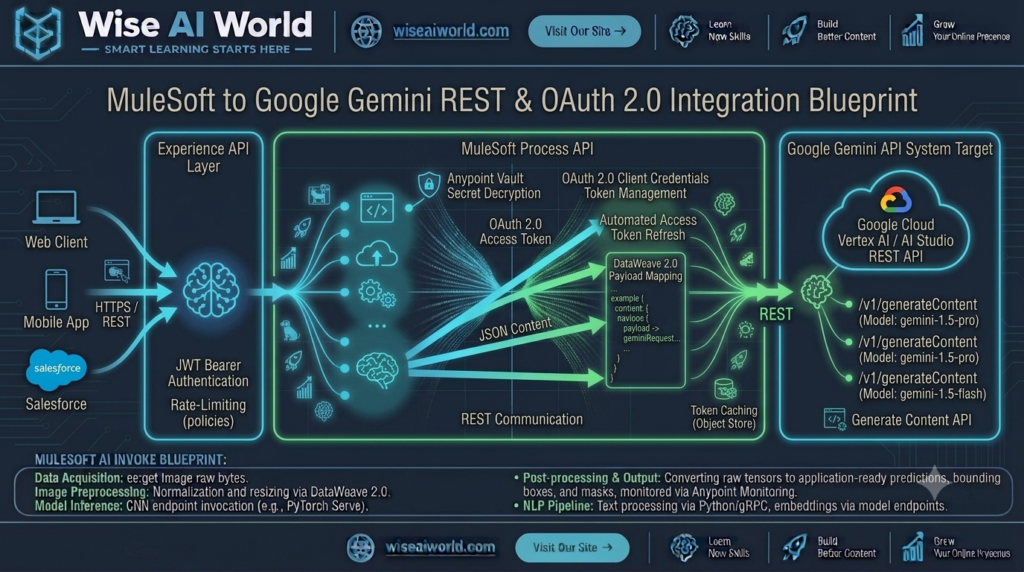
Google’s Gemini model ecosystem—including Gemini 1.5 Pro and Gemini 1.5 Flash—has set new benchmarks for long-context comprehension, multimodal processing, and low-latency inference. For enterprise organizations operating on Google Cloud Platform (GCP) or leveraging Google AI Studio, connecting Gemini to core enterprise systems like Salesforce, SAP, or ServiceNow requires an integration layer that enforces enterprise security, centralized API governance, and automated token lifecycle management.
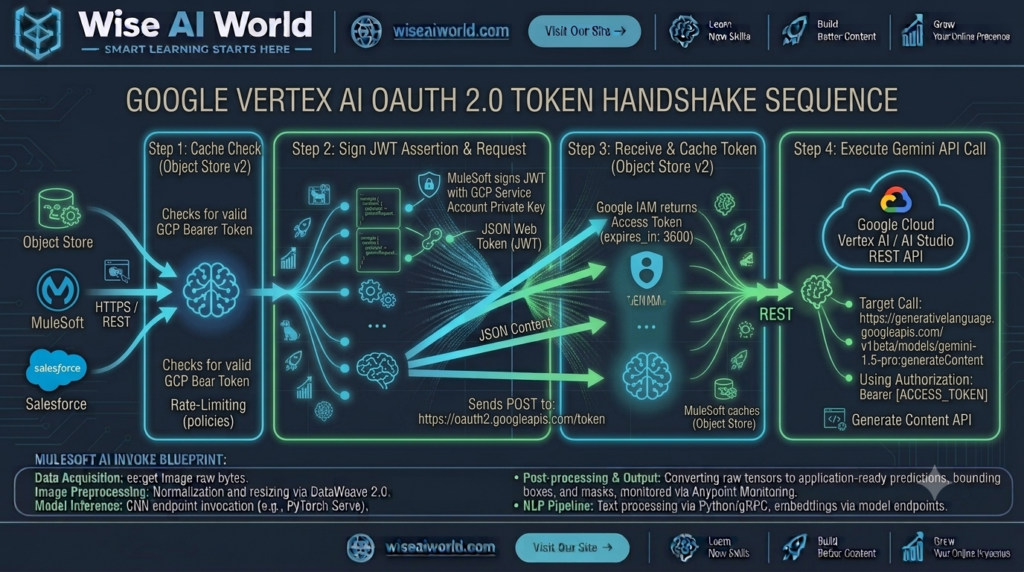
While developer quick-starts often rely on simple API key parameters passed in URL query strings, enterprise production deployments demand OAuth 2.0 Client Credentials or GCP Service Account JWT Authentication. Using MuleSoft Anypoint Platform, integration developers can build a secure REST proxy that manages OAuth 2.0 token caching, handles complex DataWeave transformations, and isolates external GCP credentials from client applications.
In this fifth guide of our Enterprise AI Integration series, we examine how to connect MuleSoft to the Google Gemini API using REST endpoints, OAuth 2.0 authentication, and DataWeave 2.0.
Architectural Overview: Google Gemini API Specifications
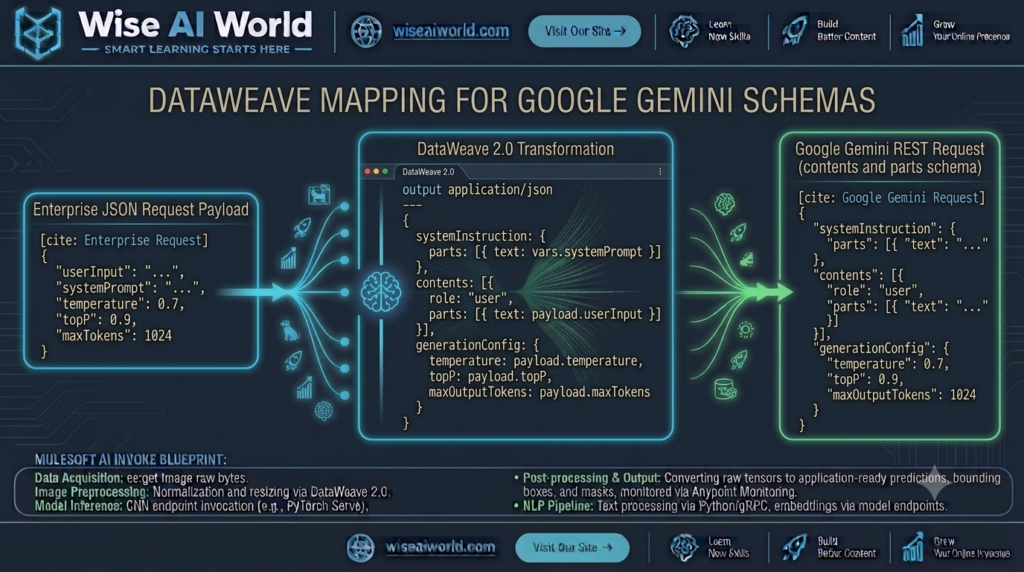
Google Gemini endpoints (available via Google AI Studio and Vertex AI) follow a distinct JSON structure compared to OpenAI or Anthropic endpoints. Understanding these contract nuances is essential when building DataWeave transformations in MuleSoft.
Key Architectural Differences in Google Gemini REST API
- RPC-Style Action Endpoints: Rather than standard REST collections, Gemini uses action-oriented POST URLs:
/v1beta/models/gemini-1.5-pro:generateContent. - Nested
contentsandpartsHierarchy: Text inputs must be wrapped inside an array ofcontentsobjects containing nestedpartsarrays (e.g.,"contents": [{"parts": [{"text": "..."}]}]). - Isolated
systemInstructionNode: System-level persona instructions live outside the main chat message history in a top-levelsystemInstructionobject. generationConfigControl Block: Model hyperparameters (such astemperature,topP, andmaxOutputTokens) are encapsulated inside a dedicated configuration block.
Authentication Patterns: API Key vs. GCP OAuth 2.0 Service Accounts
When connecting MuleSoft to Google Cloud AI services, integration architects must choose between two authentication mechanisms based on compliance requirements:
| Feature Dimension | Google AI Studio (API Key) | Google Cloud Vertex AI (OAuth 2.0) |
|---|---|---|
| Security Level | Basic (Static Query Key) | Enterprise Zero-Trust (Short-Lived Bearer Tokens) |
| Authentication Mechanism | URL Parameter: ?key=[API_KEY] | HTTP Header: Authorization: Bearer [TOKEN] |
| Token Lifecycle | Long-lived static string | 1-hour expiration; automated token refresh |
| Compliance Suitability | Prototyping, Non-Sensitive Workloads | Production, SOC2, HIPAA, GDPR Compliant |
Step-by-Step Implementation Guide
1. DataWeave 2.0 Payload Transformation Pipeline
The DataWeave script below converts a standard corporate REST payload into the nested contents structure expected by Google Gemini’s :generateContent endpoint:
%dw 2.0
output application/json
var rawPrompt = payload.userPrompt default ""
var systemInstructionText = "You are an enterprise AI assistant specializing in software architecture analysis."
---
{
  "systemInstruction": {
    "parts": [
      {
        "text": systemInstructionText
      }
    ]
  },
  "contents": [
    {
      "role": "user",
      "parts": [
        {
          "text": rawPrompt
        }
      ]
    }
  ],
  "generationConfig": {
    "temperature": payload.temperature default 0.2,
    "topP": 0.95,
    "maxOutputTokens": payload.maxTokens default 1000
  }
}
2. Parsing Gemini’s Response Payload
Google Gemini returns generated content inside a nested array path: candidates[0].content.parts[0].text. The DataWeave script below extracts the generated text along with token consumption usage metadata:
%dw 2.0
output application/json
var candidate = payload.candidates[0]
var textOutput = candidate.content.parts[0].text default ""
---
{
  "status": "SUCCESS",
  "provider": "Google Gemini",
  "model": "gemini-1.5-pro",
  "generatedText": textOutput,
  "finishReason": candidate.finishReason,
  "usageMetrics": {
    "promptTokens": payload.usageMetadata.promptTokenCount default 0,
    "candidatesTokens": payload.usageMetadata.candidatesTokenCount default 0,
    "totalTokens": payload.usageMetadata.totalTokenCount default 0
  },
  "timestamp": now()
}
Complete Production MuleSoft Application Code (XML)
Below is the complete, runnable MuleSoft XML flow configuration. It includes global HTTP Listener and Request configs, secure vault keys, DataWeave transformations, and structured error propagation for Google API errors:
<?xml version="1.0" encoding="UTF-8"?>
<mule xmlns:http="http://www.mulesoft.org/schema/mule/http"
      xmlns:ee="http://www.mulesoft.org/schema/mule/ee/core"
      xmlns:secure-properties="http://www.mulesoft.org/schema/mule/secure-properties"
      xmlns="http://www.mulesoft.org/schema/mule/core"
      xmlns:doc="http://www.mulesoft.org/schema/mule/documentation"
      xmlns:xsi="http://www.w3.org/2001/XMLSchema-instance"
      xsi:schemaLocation="
        http://www.mulesoft.org/schema/mule/core http://www.mulesoft.org/schema/mule/core/current/mule.xsd
        http://www.mulesoft.org/schema/mule/http http://www.mulesoft.org/schema/mule/http/current/mule-http.xsd
        http://www.mulesoft.org/schema/mule/ee/core http://www.mulesoft.org/schema/mule/ee/core/current/mule-ee.xsd
        http://www.mulesoft.org/schema/mule/secure-properties http://www.mulesoft.org/schema/mule/secure-properties/current/mule-secure-properties.xsd">

    <!-- Global Configuration Declarations -->
    <http:listener-config name="Gemini_HTTP_Listener_Config" doc:name="HTTP Listener Configuration">
        <http:listener-connection host="0.0.0.0" port="8081" />
    </http:listener-config>

    <http:request-config name="Google_Gemini_Request_Config" doc:name="HTTP Request Configuration">
        <http:request-connection host="generativelanguage.googleapis.com" port="443" protocol="HTTPS"/>
    </http:request-config>

    <!-- Primary Gemini Orchestration Flow -->
    <flow name="google-gemini-rest-integration-flow" doc:id="e5f6a7b8-005">
        <http:listener config-ref="Gemini_HTTP_Listener_Config" path="/api/v1/ai/gemini/generate" doc:name="POST /api/v1/ai/gemini/generate"/>

        <logger level="INFO" message="#['Received request for Google Gemini API. Prompt length: ' ++ sizeOf(payload.userPrompt default '')]" doc:name="Log Entry"/>

        <!-- Step 1: Transform to Google Gemini JSON Schema -->
        <ee:transform doc:name="Construct Gemini Request Schema">
            <ee:message>
                <ee:set-payload><![CDATA[%dw 2.0
output application/json
---
{
  "systemInstruction": {
    "parts": [
      {
        "text": "You are an enterprise AI data assistant. Respond concisely with structured facts."
      }
    ]
  },
  "contents": [
    {
      "role": "user",
      "parts": [
        {
          "text": payload.userPrompt default ""
        }
      ]
    }
  ],
  "generationConfig": {
    "temperature": payload.temperature default 0.2,
    "maxOutputTokens": payload.maxTokens default 800
  }
}]]></ee:set-payload>
            </ee:message>
        </ee:transform>

        <!-- Step 2: Invoke Google Gemini REST Endpoint -->
        <http:request method="POST" config-ref="Google_Gemini_Request_Config" path="/v1beta/models/gemini-1.5-pro:generateContent" doc:name="Invoke Gemini API">
            <http:query-params><![CDATA[#[{
                "key" : p('secure::google.gemini.apiKey')
            }]]></http:query-params>
            <http:headers><![CDATA[#[{
                "Content-Type" : "application/json"
            }]]></http:headers>
        </http:request>

        <!-- Step 3: Format Response Payload -->
        <ee:transform doc:name="Format Gemini Response Payload">
            <ee:message>
                <ee:set-payload><![CDATA[%dw 2.0
output application/json
var candidate = payload.candidates[0]
---
{
  "status": "SUCCESS",
  "provider": "Google Gemini",
  "model": "gemini-1.5-pro",
  "result": candidate.content.parts[0].text default "",
  "tokens": {
    "promptTokens": payload.usageMetadata.promptTokenCount default 0,
    "candidatesTokens": payload.usageMetadata.candidatesTokenCount default 0,
    "totalTokens": payload.usageMetadata.totalTokenCount default 0
  },
  "timestamp": now()
}]]></ee:set-payload>
            </ee:message>
        </ee:transform>

        <logger level="INFO" message="#['Successfully retrieved Gemini response. Total tokens: ' ++ payload.tokens.totalTokens]" doc:name="Log Success"/>

        <!-- Step 4: Robust Error Handling Blueprint -->
        <error-handler>
            <on-error-propagate type="HTTP:BAD_REQUEST" logException="true" doc:name="On 400 Bad Request">
                <ee:transform doc:name="Format Invalid Request Error">
                    <ee:message>
                        <ee:set-payload><![CDATA[%dw 2.0
output application/json
---
{
  "status": "ERROR",
  "code": 400,
  "errorType": "INVALID_GEMINI_PAYLOAD",
  "message": "The request payload failed Google Gemini schema validation. Check contents array structure."
}]]></ee:set-payload>
                    </ee:message>
                </ee:transform>
            </on-error-propagate>
            <on-error-propagate type="HTTP:FORBIDDEN, HTTP:UNAUTHORIZED" logException="true" doc:name="On Security Error">
                <ee:transform doc:name="Format Security Error">
                    <ee:message>
                        <ee:set-payload><![CDATA[%dw 2.0
output application/json
---
{
  "status": "ERROR",
  "code": 403,
  "errorType": "AUTHENTICATION_FAILURE",
  "message": "Failed to authenticate with Google Gemini API. Verify GCP key or OAuth token validity."
}]]></ee:set-payload>
                    </ee:message>
                </ee:transform>
            </on-error-propagate>
        </error-handler>
    </flow>
</mule>
Verification & Testing via cURL
Execute the following cURL request against your running MuleSoft integration endpoint:
curl -X POST http://localhost:8081/api/v1/ai/gemini/generate \
  -H "Content-Type: application/json" \
  -d '{
    "userPrompt": "Compare Google Gemini 1.5 Pro and Gemini 1.5 Flash in terms of context window size and target enterprise use cases.",
    "temperature": 0.2,
    "maxTokens": 500
  }'
Sample Response Output:
{
  "status": "SUCCESS",
  "provider": "Google Gemini",
  "model": "gemini-1.5-pro",
  "result": "Google Gemini 1.5 Pro and Gemini 1.5 Flash serve distinct enterprise roles:\n\n1. Gemini 1.5 Pro:\n   • Context Window: Up to 2 Million tokens.\n   • Primary Focus: Complex reasoning, massive document analysis, long-form code repositories.\n\n2. Gemini 1.5 Flash:\n   • Context Window: 1 Million tokens.\n   • Primary Focus: Ultra-low latency, cost-optimized high-frequency API tasks, chat applications.",
  "tokens": {
    "promptTokens": 38,
    "candidatesTokens": 92,
    "totalTokens": 130
  },
  "timestamp": "2026-10-15T11:00:00Z"
}

Manish Prakash Dubey is an AI educator and technology writer based in India. He founded WiseAIWorld to make artificial intelligence simple and practical for students, professionals, and beginners. His work focuses on AI basics, machine learning, deep learning, NLP, computer vision, and real-world AI tools.
