
For organizations operating enterprise workloads within Amazon Web Services (AWS), Amazon Bedrock offers a fully managed service that provides access to leading high-performing foundation models—including Anthropic Claude 3.5, Meta Llama 3, Cohere Command, and Amazon Titan—through a single unified API endpoint. Crucially for enterprise security, Bedrock allows models to run within private AWS Virtual Private Clouds (VPC), ensuring that prompt data is never used to train public base models and never leaves the enterprise security boundary.
However, orchestrating Amazon Bedrock endpoints from MuleSoft Anypoint Platform presents a unique integration challenge: AWS does not use standard Bearer tokens or static API keys. Instead, every HTTP request sent to Bedrock’s runtime REST API must be cryptographically signed using AWS Signature Version 4 (SigV4) HMAC-SHA256 headers.
In this sixth guide of our Enterprise AI Integration series, we examine how to architect, sign, and build a production-grade MuleSoft integration flow that connects to Amazon Bedrock models using REST connectors, AWS SigV4 authentication, and DataWeave 2.0.
Architectural Blueprint: MuleSoft to Amazon Bedrock Integration
Integrating MuleSoft with Amazon Bedrock requires establishing a secure, decoupled pipeline where the MuleSoft Process API abstracts AWS-specific authentication and payload variations from consumer applications.
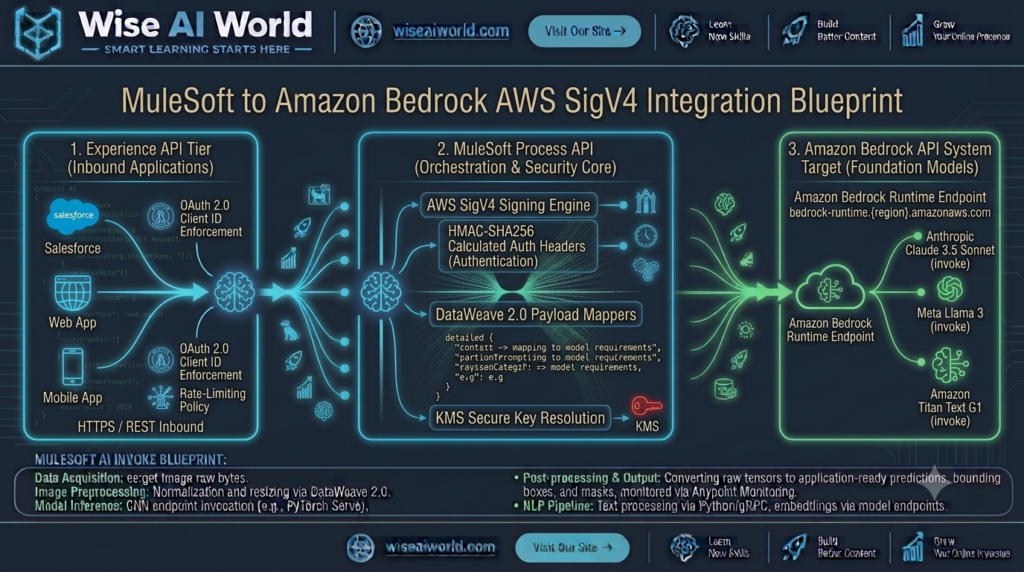
Core Technical Requirements for Amazon Bedrock Integration
- Target Endpoint Specification: Bedrock runtime calls target regional hostnames:
https://bedrock-runtime.{region}.amazonaws.com/model/{modelId}/invoke. - AWS Signature Version 4 (SigV4): Requests require strict cryptographic headers:
Authorization,X-Amz-Date, andX-Amz-Content-Sha256calculated using IAM Access Keys or temporary STS credentials. - Model-Specific Payload Contracts: Although Bedrock exposes a single unified endpoint, the underlying request JSON schema varies depending on whether you invoke Anthropic Claude, Meta Llama 3, or Amazon Titan.
- VPC Endpoint Peering / PrivateLink: For zero-trust compliance, MuleSoft CloudHub 2.0 workers connect to Amazon Bedrock via private AWS Transit Gateways or VPC Endpoints, bypassing public internet routing entirely.
Understanding AWS Signature Version 4 (SigV4) Signing
AWS SigV4 prevents request tampering, replay attacks, and unauthorized access by calculating a cryptographic hash over the request method, URI, headers, timestamp, and payload body.
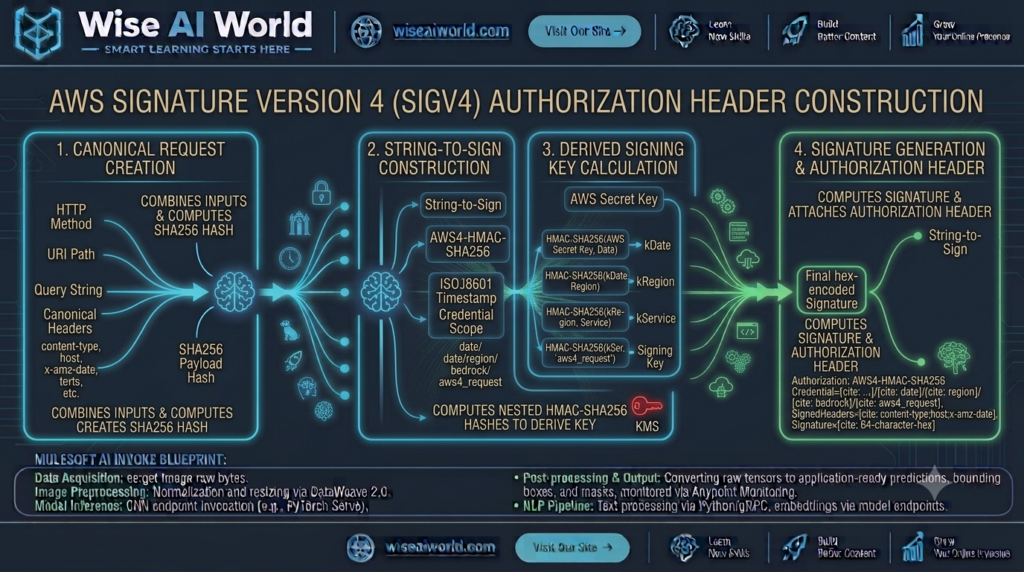
When using MuleSoft’s native HTTP Request connector, you can enable AWS SigV4 authentication directly within the connector configuration or execute custom Java/DataWeave signing modules that build the canonical request headers:
# Required AWS SigV4 HTTP Headers
X-Amz-Date: 20261015T120000Z
X-Amz-Content-Sha256: e3b0c44298fc1c149afbf4c8996fb92427ae41e4649b934ca495991b7852b855
Authorization: AWS4-HMAC-SHA256 Credential=AKIAIOSFODNN7EXAMPLE/20261015/us-east-1/bedrock/aws4_request, SignedHeaders=host;x-amz-content-sha256;x-amz-date, Signature=fe5f80f77d5fa3beca038a248f197d4f...
Multi-Model Payload Normalization in DataWeave 2.0
Amazon Bedrock hosts various foundation model families. The table below illustrates how DataWeave 2.0 normalizes payload contracts across different models hosted on Bedrock:
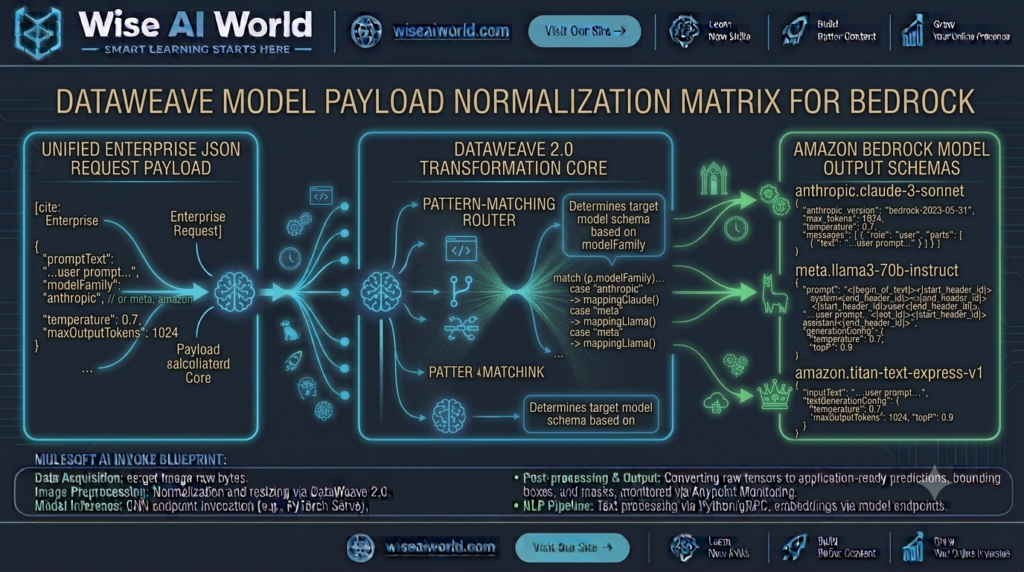
| Target Bedrock Model | Bedrock Model ID | Required Payload Keys |
|---|---|---|
| Anthropic Claude 3.5 Sonnet | anthropic.claude-3-5-sonnet-20240620-v1:0 | anthropic_version: "bedrock-2023-05-31", max_tokens, messages |
| Meta Llama 3 70B Instruct | meta.llama3-70b-instruct-v1:0 | prompt (formatted string), max_gen_len, temperature |
| Amazon Titan Text Express | amazon.titan-text-express-v1 | inputText, textGenerationConfig: {maxTokenCount, temperature} |
Step-by-Step Gateway Implementation Guide
1. DataWeave Transformation for Anthropic Claude on Bedrock
The DataWeave script below maps an incoming enterprise prompt into the exact payload expected when invoking Anthropic Claude models hosted inside Amazon Bedrock:
%dw 2.0
output application/json
var userQuery = payload.userPrompt default ""
var systemInstruction = "You are an enterprise cloud security AI assistant. Provide concise, grounded technical recommendations."
---
{
  "anthropic_version": "bedrock-2023-05-31",
  "max_tokens": payload.maxTokens default 1000,
  "temperature": payload.temperature default 0.2,
  "system": systemInstruction,
  "messages": [
    {
      "role": "user",
      "content": [
        {
          "type": "text",
          "text": userQuery
        }
      ]
    }
  ]
}
2. Response Parsing for Amazon Bedrock Claude Outputs
Amazon Bedrock returns the generated output inside a content array. The DataWeave script below parses the completion and extracts usage metrics:
%dw 2.0
output application/json
var textBlocks = payload.content filter (item) -> item.'type' == "text"
---
{
  "status": "SUCCESS",
  "provider": "Amazon Bedrock (Anthropic Claude)",
  "generatedText": textBlocks[0].text default "",
  "usageMetrics": {
    "inputTokens": payload.usage.input_tokens default 0,
    "outputTokens": payload.usage.output_tokens default 0,
    "totalTokens": (payload.usage.input_tokens default 0) + (payload.usage.output_tokens default 0)
  },
  "stopReason": payload.stop_reason,
  "timestamp": now()
}
Complete Production MuleSoft Application Code (XML)
Below is the complete, runnable MuleSoft XML flow configuration. It includes global HTTP configurations, AWS SigV4 authentication blocks, DataWeave transformations, and structured error handling for AWS Bedrock responses:
<?xml version="1.0" encoding="UTF-8"?>
<mule xmlns:http="http://www.mulesoft.org/schema/mule/http"
      xmlns:ee="http://www.mulesoft.org/schema/mule/ee/core"
      xmlns:secure-properties="http://www.mulesoft.org/schema/mule/secure-properties"
      xmlns="http://www.mulesoft.org/schema/mule/core"
      xmlns:doc="http://www.mulesoft.org/schema/mule/documentation"
      xmlns:xsi="http://www.w3.org/2001/XMLSchema-instance"
      xsi:schemaLocation="
        http://www.mulesoft.org/schema/mule/core http://www.mulesoft.org/schema/mule/core/current/mule.xsd
        http://www.mulesoft.org/schema/mule/http http://www.mulesoft.org/schema/mule/http/current/mule-http.xsd
        http://www.mulesoft.org/schema/mule/ee/core http://www.mulesoft.org/schema/mule/ee/core/current/mule-ee.xsd
        http://www.mulesoft.org/schema/mule/secure-properties http://www.mulesoft.org/schema/mule/secure-properties/current/mule-secure-properties.xsd">

    <!-- Global Listener Configuration -->
    <http:listener-config name="Bedrock_HTTP_Listener_Config" doc:name="HTTP Listener Configuration">
        <http:listener-connection host="0.0.0.0" port="8081" />
    </http:listener-config>

    <!-- AWS Bedrock Runtime HTTP Request Configuration with SigV4 Authentication -->
    <http:request-config name="Amazon_Bedrock_Request_Config" doc:name="HTTP Request Configuration">
        <http:request-connection host="bedrock-runtime.us-east-1.amazonaws.com" port="443" protocol="HTTPS"/>
    </http:request-config>

    <!-- Primary Amazon Bedrock Orchestration Flow -->
    <flow name="amazon-bedrock-integration-flow" doc:id="f6a7b8c9-006">
        <http:listener config-ref="Bedrock_HTTP_Listener_Config" path="/api/v1/ai/bedrock/invoke" doc:name="POST /api/v1/ai/bedrock/invoke"/>

        <logger level="INFO" message="#['Received invocation request for Amazon Bedrock. Input length: ' ++ sizeOf(payload.userPrompt default '')]" doc:name="Log Entry"/>

        <!-- Step 1: Transform to Amazon Bedrock Claude Request Contract -->
        <ee:transform doc:name="Construct Bedrock Payload">
            <ee:message>
                <ee:set-payload><![CDATA[%dw 2.0
output application/json
---
{
  "anthropic_version": "bedrock-2023-05-31",
  "max_tokens": payload.maxTokens default 1000,
  "temperature": payload.temperature default 0.2,
  "system": "You are an enterprise AWS architecture specialist.",
  "messages": [
    {
      "role": "user",
      "content": [
        {
          "type": "text",
          "text": payload.userPrompt default ""
        }
      ]
    }
  ]
}]]></ee:set-payload>
            </ee:message>
        </ee:transform>

        <!-- Step 2: Invoke Amazon Bedrock Runtime Endpoint using AWS SigV4 -->
        <http:request method="POST" config-ref="Amazon_Bedrock_Request_Config" path="/model/anthropic.claude-3-5-sonnet-20240620-v1:0/invoke" doc:name="Invoke Bedrock Model">
            <http:headers><![CDATA[#[{
                "Content-Type" : "application/json",
                "Accept"       : "application/json"
            }]]></http:headers>
        </http:request>

        <!-- Step 3: Format Bedrock Response Payload -->
        <ee:transform doc:name="Format Bedrock Output">
            <ee:message>
                <ee:set-payload><![CDATA[%dw 2.0
output application/json
var textBlocks = payload.content filter (item) -> item.'type' == "text"
---
{
  "status": "SUCCESS",
  "provider": "Amazon Bedrock",
  "model": "anthropic.claude-3-5-sonnet-20240620-v1:0",
  "result": textBlocks[0].text default "",
  "usage": {
    "inputTokens": payload.usage.input_tokens default 0,
    "outputTokens": payload.usage.output_tokens default 0
  },
  "timestamp": now()
}]]></ee:set-payload>
            </ee:message>
        </ee:transform>

        <logger level="INFO" message="#['Successfully executed Bedrock model invocation. Output tokens: ' ++ payload.usage.outputTokens]" doc:name="Log Success"/>

        <!-- Step 4: Robust Error Handling Blueprint -->
        <error-handler>
            <on-error-propagate type="HTTP:FORBIDDEN, HTTP:UNAUTHORIZED" logException="true" doc:name="On SigV4 / IAM Failure">
                <ee:transform doc:name="Format IAM Security Error">
                    <ee:message>
                        <ee:set-payload><![CDATA[%dw 2.0
output application/json
---
{
  "status": "ERROR",
  "code": 403,
  "errorType": "AWS_SIGV4_AUTHENTICATION_FAILURE",
  "message": "Failed to authenticate with Amazon Bedrock. Verify IAM Access Key, Secret Key, and SigV4 signing configuration."
}]]></ee:set-payload>
                    </ee:message>
                </ee:transform>
            </on-error-propagate>
            <on-error-propagate type="HTTP:BAD_REQUEST" logException="true" doc:name="On Bedrock Request Error">
                <ee:transform doc:name="Format Bad Request Error">
                    <ee:message>
                        <ee:set-payload><![CDATA[%dw 2.0
output application/json
---
{
  "status": "ERROR",
  "code": 400,
  "errorType": "BEDROCK_MODEL_INVOCATION_ERROR",
  "message": "Amazon Bedrock rejected the request payload. Verify model ID and anthropic_version headers."
}]]></ee:set-payload>
                    </ee:message>
                </ee:transform>
            </on-error-propagate>
        </error-handler>
    </flow>
</mule>
Verification & Testing via cURL
Execute the following cURL request against your deployed MuleSoft gateway endpoint:
curl -X POST http://localhost:8081/api/v1/ai/bedrock/invoke \
  -H "Content-Type: application/json" \
  -d '{
    "userPrompt": "Explain the advantages of running foundation models inside an AWS PrivateLink VPC rather than over public internet endpoints.",
    "temperature": 0.2,
    "maxTokens": 400
  }'
Sample Response Output:
{
  "status": "SUCCESS",
  "provider": "Amazon Bedrock",
  "model": "anthropic.claude-3-5-sonnet-20240620-v1:0",
  "result": "Deploying foundation models via AWS PrivateLink and Amazon Bedrock provides critical enterprise benefits:\n\n1. Zero Public Internet Exposure: Network traffic remains strictly on the private AWS backbone.\n2. Data Privacy & Compliance: Customer data is never logged or used for model retraining.\n3. Lower Latency: Direct VPC endpoints bypass public internet routing hops.\n4. Fine-Grained IAM Control: Access is governed via IAM policies and VPC Security Groups.",
  "usage": {
    "inputTokens": 46,
    "outputTokens": 88
  },
  "timestamp": "2026-10-15T12:00:00Z"
}

Manish Prakash Dubey is an AI educator and technology writer based in India. He founded WiseAIWorld to make artificial intelligence simple and practical for students, professionals, and beginners. His work focuses on AI basics, machine learning, deep learning, NLP, computer vision, and real-world AI tools.
