The AI writing tools market has matured dramatically. What started in 2022 as a wave of products that felt like novelties has consolidated into a landscape where a handful of tools deliver genuine, measurable productivity gains for specific types of writers and workflows. At the same time, a persistent reality has emerged: most dedicated AI writing tools are built on top of the same underlying language models from OpenAI, Anthropic, or Google, which means the value they offer often comes from workflow features, templates, and integrations rather than fundamentally superior AI capability.
This guide reviews the best AI writing tools available in 2026, who each tool is genuinely best for, what it actually costs, and how to choose the right combination for your specific needs without overspending on subscriptions you do not need.
How to Think About AI Writing Tools in 2026
Before reviewing individual tools, the most important thing to understand about the AI writing tool market in 2026 is the distinction between raw language models and the products built on top of them.
According to Ad Library’s AI writing tools comparison, most dedicated AI writing tools including Jasper, Copy.ai, Writesonic, and Rytr use OpenAI’s API as their core model. They are, in technical terms, wrappers around GPT-4o or similar models, with a user interface, templates, and workflow features added on top. The underlying intelligence is rented. The value, if any, comes from the interface, templates, workflow automation, and brand voice training built around that intelligence.
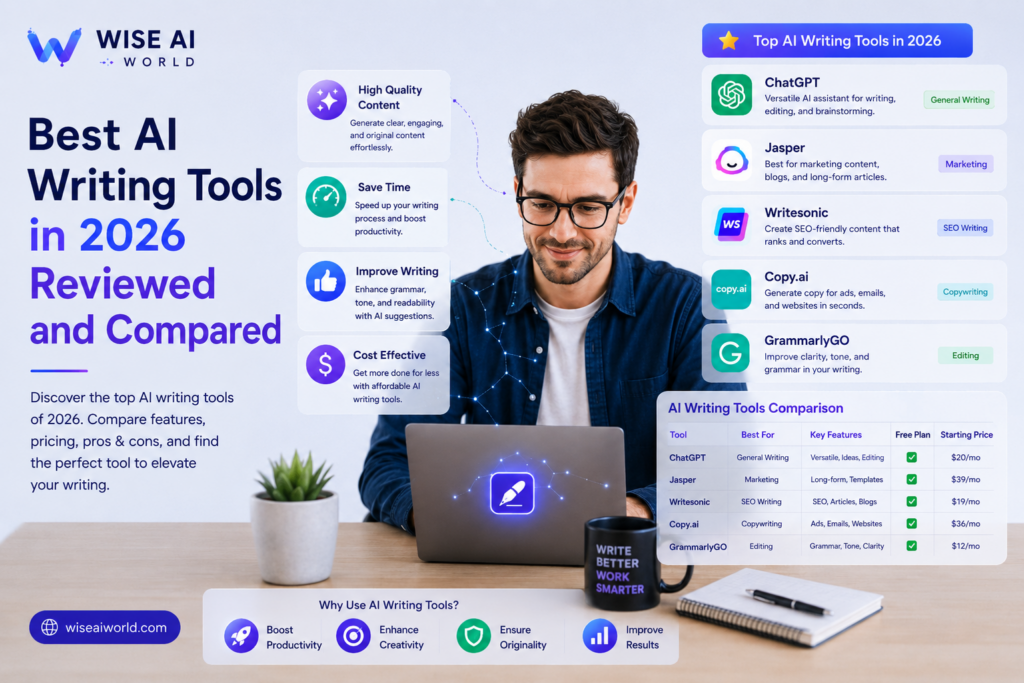
This means that for someone who writes occasionally or handles varied tasks, a direct subscription to or a similar base model often delivers better value than a specialized writing tool at two to three times the price. Specialized tools earn their premium when you are a marketing team that needs consistent brand voice at scale, an SEO team running high-volume content production, or a fiction writer who benefits from purpose-built creative writing features.
With that framing in place, here are the tools that consistently stand out in 2026 across different use cases.
Best Overall for Writing Quality: Claude
For pure writing quality across long-form content, nuanced editing, complex arguments, and maintaining a consistent voice across a long document, multiple independent reviews in 2026 point to Claude as the strongest performer. According to DIY AI’s 2026 writing tools ranking, which evaluated tools on output quality, creativity, factual accuracy, tone adaptability, context memory, and cost efficiency, Claude produces longer, more coherent, and more nuanced output than ChatGPT or Gemini in hands-on testing across long-form articles, technical documentation, analysis pieces, and email writing.
According to zPlatform’s hands-on comparison, for most solo writers and small teams, Claude Pro at 20 US dollars per month combined with Grammarly Premium at around 12 US dollars per month covers 90 percent of writing needs at 32 US dollars per month total. Claude is particularly strong for long-form articles, academic writing with complex arguments, technical content, and scenarios where retaining context across a very long document matters.
Limitation to know: Claude is stricter on certain content categories including health, finance, and legal claims, which can be a limitation for marketers in those industries who need more permissive copy generation.
Best for Versatility and General Use: ChatGPT
According to Dev.to’s 2026 AI writing tools ranking, remains incredibly capable for blog posts, emails, social media captions, product descriptions, and virtually anything else you throw at it. The GPT-4o model is fast, accurate, and the free tier now includes GPT-4o access with usage limits, making it accessible to everyone before committing to a paid subscription.
ChatGPT at 20 US dollars per month is consistently recommended as the starting point for most people, particularly given that it handles roughly 80 percent of common writing use cases at one-third the price of specialized marketing tools. According to DiscreteAI’s roundup, the recommendation is to start with ChatGPT Plus and add specialized tools only when you genuinely outgrow its capabilities for your specific workflows.
ChatGPT is also the strongest option for code-adjacent writing and scenarios where you need creative range across very different content types within a single workflow, since it is more flexible on content categories than Claude in most cases.
Best for Marketing Teams: Jasper AI
For marketing teams with three or more people who need to produce brand-consistent content at scale, Jasper is the tool that consistently earns its premium over raw ChatGPT access. According to ToolCenter’s 2026 comparison, Jasper’s Brand Voice system maintains consistency across all content, and its Campaigns feature generates a full multi-channel package including a blog post, social posts, email, and ad copy from a single brief, compressing what might take a day of work into roughly an hour.
Jasper integrates with Surfer SEO, Grammarly, and Webflow, connecting AI writing directly to the tools already in a marketing team’s workflow. According to Toolradar, Jasper’s new Agents feature handles optimization, personalization, and research autonomously, and its AEO and SEO Rewriter became its fastest-growing feature in 2025 to 2026. The Creator plan was discontinued in August 2025, with current pricing starting at 59 US dollars per seat per month on an annual plan or 69 US dollars monthly, plus custom Business pricing for larger teams.
The honest limitation is that Jasper’s core generation capability is powered by the same GPT-4o model available in ChatGPT. What you are paying for is the brand voice training, campaign workflow, templates, and team collaboration features. For a solo writer or small team, that premium is hard to justify. For a marketing team producing high volumes of brand-consistent content across multiple channels, it is often worth it.
Best for Ad Copy and Sales Content: Copy.ai
Copy.ai is the fastest way to generate marketing copy, particularly for ad copy, email subject lines, product descriptions, and social media content. According to DiscreteAI, Copy.ai is rated 4.3 out of 5 and is best for solo marketers, ad copy, and social media, at 49 US dollars per month for the Pro plan or free for up to 2,000 words per month, which is the most generous free tier of any major AI writing tool.
Copy.ai is better than Jasper for solo users who want affordability and simplicity, while Jasper is better for teams needing brand control and multi-user collaboration. According to Ad Library’s wrapper versus real value analysis, Copy.ai’s core text generation use case is largely replicable with a direct ChatGPT subscription, but its GTM workflow automations and outbound copy templates add meaningful value for sales-focused teams if those specific workflows match your needs.
Best for Editing and Polishing: Grammarly
Grammarly occupies a unique position in the AI writing tools market because it solves a different problem from generation tools. According to ToolCenter, Grammarly is the gold standard for editing, grammar, tone correction, and polish, and its grammar and style corrections remain best in class with fewer false positives than any competitor. It is not a content generation tool in the same way as ChatGPT or Jasper. It is an always-on writing companion that works across Gmail, Google Docs, LinkedIn, Slack, and virtually every text field you use.
In 2026, Grammarly has added generative AI features including rewriting, tone adjustment, and draft generation, making it more of a full writing assistant than it was historically. However, its core strength remains editing rather than generation, and the recommendation from multiple independent sources is to use it alongside a generative tool rather than instead of one. The free tier handles basic grammar and spelling. The Premium plan at around 12 US dollars per month adds clarity suggestions, tone detection, full-sentence rewrites, and the generative features.
Best Budget Option: Rytr
For writers who need high-volume short-form content at the lowest possible cost, Rytr at 9 US dollars per month for unlimited generation is consistently recommended as the best value play. According to Dev.to’s comparison, combining Rytr at 9 US dollars per month for heavy lifting with the free ChatGPT tier for variety and flexibility delivers strong results at a total cost of 9 US dollars per month that is genuinely hard to beat for budget-conscious writers.
Rytr is best suited for quick drafts, short-form marketing copy, social media content, and email templates, rather than long-form research-based articles where the depth of a more capable model matters more.
Best for Teams Already Using Notion: Notion AI
Notion AI is not a standalone writing tool. It is AI assistance built directly into the Notion workspace platform, which makes it uniquely valuable for teams already using Notion for project management, documentation, and knowledge management. According to Dev.to, Notion AI is the top pick for teams that want minimal friction in their AI writing workflow, since it works directly within the documents and wikis the team already uses without requiring a separate application.
The key advantage is context: Notion AI can reference existing documents, project notes, and knowledge base content when generating or editing text, producing outputs that are far more relevant to your specific context than a general-purpose AI tool working without that background. It is available as an add-on to Notion plans.
Best for Research-Led Writing: Perplexity AI
For writers who need to produce research-backed content with accurate, citable sources, Perplexity AI stands apart from pure generation tools. According to DIY AI, Perplexity Sonar Pro is the best research-led option for outlines, summaries, and research-backed writing where accuracy and source attribution matter. Rather than generating text from training data patterns alone, it searches the web in real time and synthesizes information from current sources, making it particularly strong for topical articles, industry analysis, and any content where factual currency matters.
How to Choose the Right Combination
The clearest insight from reviewing all of these tools together is that no single tool dominates every use case, and the best results typically come from combining two tools: one for generation and one for editing. According to ToolCenter, the most common effective combinations in 2026 are as follows.
For marketing professionals, Jasper or Copy.ai for generation combined with Grammarly for editing comes to around 61 US dollars per month and covers high-volume brand-consistent content needs.
For students and academic writers, QuillBot for paraphrasing and restructuring combined with Grammarly Free for editing costs around 10 US dollars per month and covers most academic writing assistance needs.
For budget-conscious general writers, the combination of ChatGPT Free and Grammarly Free costs nothing and covers a surprisingly broad range of use cases before any paid subscription becomes necessary.
For solo professionals and freelancers, Claude Pro at 20 US dollars per month plus Grammarly Premium at 12 US dollars per month, totalling 32 US dollars per month, covers 90 percent of writing needs according to zPlatform’s analysis.
Understanding how to use these tools effectively also matters as much as choosing them. Read our guide on for prompting techniques that dramatically improve output quality across any AI writing tool, since the same principles apply regardless of which platform you use.
Key Takeaways
- Most dedicated AI writing tools including Jasper, Copy.ai, Writesonic, and Rytr are built on top of OpenAI or Anthropic models. The value they add comes from workflow features, brand voice training, and templates rather than fundamentally different AI capability.
- Claude is rated the strongest for long-form writing quality, nuance, and context retention. ChatGPT Plus is the best all-round value for versatility. Jasper leads for marketing teams needing brand-consistent content at scale.
- Grammarly remains the best-in-class editing and polishing tool and should be used alongside a generation tool rather than instead of one.
- For most individuals, starting with ChatGPT Plus at 20 US dollars per month and adding specialized tools only when needed is the most cost-effective approach.
- Copy.ai offers the most generous free tier at 2,000 words per month. Rytr at 9 US dollars per month is the best value for high-volume short-form content on a tight budget.
- The best results come from combining a generation tool with an editing tool rather than expecting one subscription to do everything.
Conclusion
The AI writing tools market in 2026 offers genuinely excellent options at every price point, from completely free combinations that cover most casual writing needs to enterprise-grade platforms that compress days of marketing work into hours. The key to choosing well is being honest about your actual workflow, how much you write, what type of content you produce, whether you work alone or on a team, and whether you need brand consistency features or simply better writing assistance.
Start with the least expensive option that covers your needs, and add specialized tools only when you have a specific workflow problem they clearly solve. To explore related tools, read our guide on for a broader look at how AI writing tools fit into a complete AI-powered workflow.
Sources
- DIY AI: Best AI Writing Tools 2026 Tested for Long Form Drafting Editing and Brand Copy
- Dev.to: Best AI Writing Tools 2026 Ranked and Compared
- zPlatform: 10 Best AI Writing Tools in 2026 Hands On Tested and Ranked
- ToolCenter: Best AI Writing Tools 2026 Ten Tools Compared
- DiscreteAI: Best AI Writing Tools 2026 Top 7 Platforms Ranked and Reviewed
- Ad Library: AI Writing Tools Compared 2026 Wrapper vs Real Value
- Toolradar: 10 Best AI Writing Tools in 2026 Tested and Compared

Manish Prakash Dubey is an AI educator and technology writer based in India. He founded WiseAIWorld to make artificial intelligence simple and practical for students, professionals, and beginners. His work focuses on AI basics, machine learning, deep learning, NLP, computer vision, and real-world AI tools.
