
Enterprise integration architectures are undergoing a massive transformation. For decades, integration engineering revolved around deterministic workflows: extracting structured data from an ERP, transforming it using rigid schema definitions, and loading it into a target database or CRM. However, with the rapid rise of Large Language Models (LLMs), AI autonomous agents, and Retrieval-Augmented Generation (RAG) pipelines, enterprise systems must now process non-deterministic, context-heavy human language alongside traditional transactional data.
Connecting LLMs directly to frontend web portals, mobile apps, or core enterprise backends using ad-hoc, point-to-point HTTP requests creates severe architectural liabilities—including exposed secrets, uncontrolled token usage costs, lack of auditability, and vendor lock-in. This is where MuleSoft Anypoint Platform and the API-Led Connectivity paradigm become essential. In this inaugural guide of our Enterprise AI Integration series, we examine how to architect, secure, and scale an enterprise-grade AI integration fabric using MuleSoft.
The Need for a Middleware Integration Proxy in Enterprise AI
Integrating generative AI models directly into enterprise client applications exposes organizations to several operational and security risks:
- Exposed API Credentials & Secret Creep: Hardcoding vendor tokens (such as OpenAI, Anthropic, or AWS Bedrock keys) in client-side code or lightweight backend microservices creates significant security risks and compliance violations.
- Tight Coupling & Vendor Lock-In: Direct dependencies on a single LLM vendor mean that if pricing changes, models deprecate, or service outages occur, switching to a secondary provider requires refactoring client code and re-deploying application binaries.
- Uncontrolled Token Costs & Rate Limits: Without request throttling, token usage quotas, and caching layers at the gateway, unauthorized requests or looping routines can quickly result in thousands of dollars in unmonitored API charges.
- Data Privacy & Compliance Violations: Regulations such as GDPR, HIPAA, and PCI-DSS strictly forbid sending unmasked Personally Identifiable Information (PII) or confidential corporate records to external AI model endpoints.
A dedicated MuleSoft Integration Layer abstracts external AI vendors behind governed, reusable API contracts—enforcing zero-trust security, real-time data masking, intelligent cost optimization, and multi-model fallback before any request reaches an external LLM.
Designing API-Led Connectivity for Generative AI
MuleSoft’s API-Led Connectivity methodology categorizes APIs into three distinct tiers: System APIs, Process APIs, and Experience APIs. Applying this architecture to Generative AI workloads brings order, modularity, and enterprise governance to complex AI workflows.
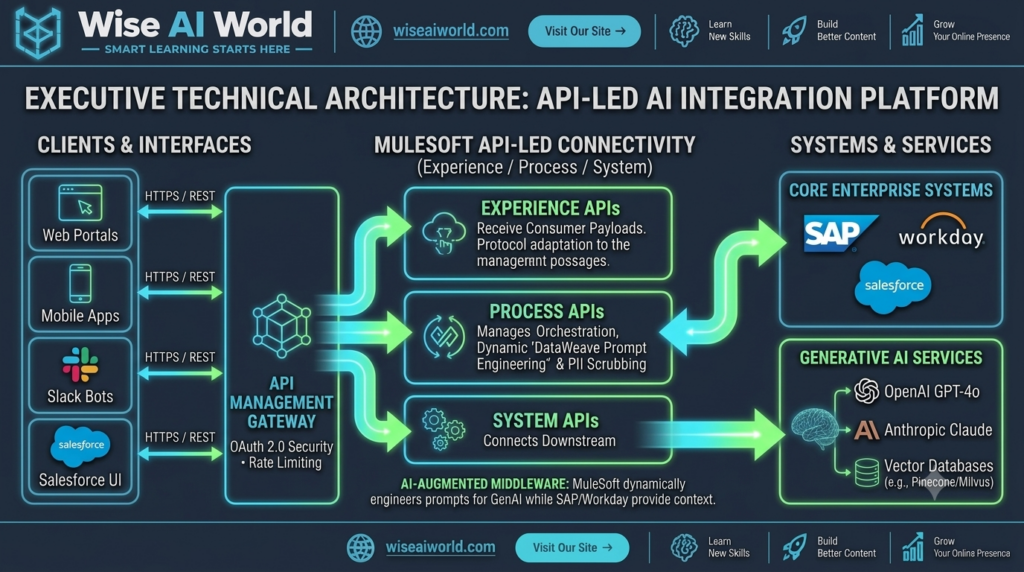
1. System APIs (Connecting Core Systems & AI Providers)
System APIs unlock underlying systems of record and raw external provider endpoints, isolating upstream flows from downstream schema changes or vendor API updates.
- OpenAI / Anthropic System API: Encapsulates low-level HTTP client logic, header authentication, retry policies, and low-level error handling for external model endpoints.
- Vector DB System API: Manages vector embeddings storage and similarity search requests to databases like Pinecone, Qdrant, or PostgreSQL
pgvector. - ERP / CRM System API: Safely pulls real-time customer data, order history, or support tickets from Salesforce, SAP, or Workday to serve as factual context.
2. Process APIs (Orchestration, Prompt Engineering & Rules)
Process APIs combine, transform, and enrich data across multiple System APIs. In an AI integration landscape, the Process API acts as the core orchestration engine:
- Constructs dynamic prompts by retrieving live enterprise data and merging it with prompt templates using DataWeave 2.0.
- Enforces automated PII scrubbing, redacting sensitive names, social security numbers, and financial records before sending payloads downstream.
- Executes multi-provider fallback logic (e.g., automatically routing traffic to Anthropic Claude if OpenAI returns a 5xx server error or rate-limit code).
3. Experience APIs (Consumable Endpoints for Frontends)
Experience APIs expose purpose-built HTTP/REST, GraphQL, or WebSocket endpoints tailored to specific consumer channels—such as web apps, mobile solutions, Slack bots, or internal administrative portals.
End-to-End Execution Flow & Sequence Blueprint
The sequence diagram below illustrates how a natural language request from a client application safely flows through the 3-tier API architecture to return grounded, validated AI responses:
[User / Client Application]
       │
       │ 1. POST /api/v1/support/query (REST + Bearer Token)
       ▼
[Experience API Layer]
       │ Enforces OAuth 2.0, Client ID Enforcement & Rate Limits
       │ 2. Forward payload
       ▼
[Process API Layer (Orchestrator)]
       ├───► [System API: Salesforce]  ──► Fetch Account & Case History
       ├───► [System API: Vector DB]   ──► Query Relevant Knowledge Snippets
       │
       │ 3. DataWeave 2.0: Mask PII + Assemble Grounded Prompt
       │
       ├───► [System API: LLM Engine]  ──► Execute Dynamic Prompt Completion
       │
       │ 4. Validate JSON Output Schema / Post-Process Content
       ▼
[Experience API Layer]
       │ 5. Return Clean Structured Response
       ▼
[User / Client Application]
Hands-On Architectural Implementation
Below is a production-grade implementation of an Enterprise AI Process Flow inside MuleSoft, demonstrating dynamic prompt construction in DataWeave 2.0, secure key injection, and structured error handling.
1. Dynamic Prompt Construction in DataWeave 2.0
This DataWeave 2.0 transformation retrieves incoming user prompts, combines them with fetched enterprise context, redacts basic credit card patterns using regular expressions, and builds a standard JSON request for an LLM completion API:
%dw 2.0
output application/json
import * from dw::core::Strings

var accountContext = vars.accountHistory default []
var rawQuery = payload.userQuery default ""
// Scrub sensitive card numbers (16-digit patterns)
var sanitizedQuery = rawQuery replace /([0-9]{4}-?){3}[0-9]{4}/ with "[REDACTED_CARD]"
var systemInstruction = "You are an enterprise support AI assistant. Answer using ONLY the provided context snippets. Do not expose internal database keys or customer PII."
---
{
  "model": "gpt-4o",
  "temperature": 0.2,
  "max_tokens": 600,
  "messages": [
    {
      "role": "system",
      "content": systemInstruction
    },
    {
      "role": "user",
      "content": "Enterprise Context:\n" ++ (accountContext joinBy "\n") ++ "\n\nUser Question: " ++ sanitizedQuery
    }
  ]
}
2. Declarative MuleSoft Flow Configuration (XML)
This complete XML configuration establishes a MuleSoft flow that accepts API requests, retrieves secure properties, executes the LLM HTTP request, and handles rate-limit exceptions gracefully:
<?xml version="1.0" encoding="UTF-8"?>
<mule xmlns:http="http://www.mulesoft.org/schema/mule/http"
      xmlns:ee="http://www.mulesoft.org/schema/mule/ee/core"
      xmlns="http://www.mulesoft.org/schema/mule/core"
      xmlns:doc="http://www.mulesoft.org/schema/mule/documentation"
      xmlns:xsi="http://www.w3.org/2001/XMLSchema-instance"
      xsi:schemaLocation="
        http://www.mulesoft.org/schema/mule/core http://www.mulesoft.org/schema/mule/core/current/mule.xsd
        http://www.mulesoft.org/schema/mule/http http://www.mulesoft.org/schema/mule/http/current/mule-http.xsd
        http://www.mulesoft.org/schema/mule/ee/core http://www.mulesoft.org/schema/mule/ee/core/current/mule-ee.xsd">

    <!-- Global Listener & HTTP Request Configs -->
    <http:listener-config name="HTTP_Listener_config">
        <http:listener-connection host="0.0.0.0" port="8081" />
    </http:listener-config>

    <http:request-config name="OpenAI_HTTP_Request_Config">
        <http:request-connection host="${secure::openai.host}" port="443" protocol="HTTPS"/>
    </http:request-config>

    <flow name="post-ai-completion-orchestration-flow" doc:id="a1b2c3d4-001">
        <http:listener config-ref="HTTP_Listener_config" path="/api/v1/ai/completion" doc:name="POST /api/v1/ai/completion"/>

        <logger level="INFO" message="Received enterprise AI completion request" doc:name="Log Incoming Request"/>

        <!-- Construct LLM Request Payload via DataWeave -->
        <ee:transform doc:name="Construct LLM Payload">
            <ee:message>
                <ee:set-payload><![CDATA[%dw 2.0
output application/json
---
{
  "model": "gpt-4o",
  "temperature": 0.2,
  "messages": [
    { "role": "system", "content": "You are a secure corporate assistant." },
    { "role": "user", "content": payload.userQuery }
  ]
}]]></ee:set-payload>
            </ee:message>
        </ee:transform>

        <!-- Secure HTTP Call to Remote AI Engine -->
        <http:request method="POST" config-ref="OpenAI_HTTP_Request_Config" path="/v1/chat/completions" doc:name="Invoke External AI Model">
            <http:headers><![CDATA[#[{
                "Authorization" : "Bearer " ++ p('secure::openai.apiKey'),
                "Content-Type"  : "application/json"
            }]]></http:headers>
        </http:request>

        <!-- Format Final Output Payload -->
        <ee:transform doc:name="Format Final Output">
            <ee:message>
                <ee:set-payload><![CDATA[%dw 2.0
output application/json
---
{
  "status": "SUCCESS",
  "generatedResponse": payload.choices[0].message.content,
  "usageMetrics": {
    "promptTokens": payload.usage.prompt_tokens,
    "completionTokens": payload.usage.completion_tokens,
    "totalTokens": payload.usage.total_tokens
  },
  "timestamp": now()
}]]></ee:set-payload>
            </ee:message>
        </ee:transform>

        <!-- Error Handling Blueprint -->
        <error-handler>
            <on-error-propagate type="HTTP:TOO_MANY_REQUESTS, HTTP:TIMEOUT" logException="true" doc:name="Handle Provider Rate Limits">
                <ee:transform doc:name="Set Rate Limit Response">
                    <ee:message>
                        <ee:set-payload><![CDATA[%dw 2.0
output application/json
---
{
  "status": "ERROR",
  "code": 429,
  "message": "AI Provider rate limit reached. Engage fallback router or retry later."
}]]></ee:set-payload>
                    </ee:message>
                </ee:transform>
            </on-error-propagate>
        </error-handler>
    </flow>
</mule>
Best Practices for Production AI Gateways
- Implement Token-Based Throttling: Traditional rate-limiting policies measure raw HTTP request counts. Because LLM pricing depends on context window token counts, configure custom DataWeave headers to track token consumption and enforce usage tiers using Anypoint API Manager.
- Centralize Credential Security: Store API credentials in encrypted Vault files using the Anypoint Secure Properties module or integrate directly with HashiCorp Vault or AWS Secrets Manager.
- Enable Comprehensive Observability: Log provider latencies, HTTP status codes, and token usage metrics directly into Anypoint Monitoring, OpenTelemetry collector endpoints, or ELK stacks.
- Architect for Resilience & High Availability: Implement
Choice RoutersorUntil-Successfulscopes to automatically route traffic to a secondary model provider (e.g., Azure OpenAI or Anthropic Bedrock) if the primary model endpoint experiences downtime.

