
Once your Anypoint Studio or Anypoint Code Builder environment is configured, the first foundational milestone in enterprise AI integration is invoking a Large Language Model (LLM) endpoint directly from a MuleSoft integration flow. While consuming external REST APIs is a standard MuleSoft pattern, connecting to LLMs requires handling specific requirements: formatting multi-role JSON payloads, managing dynamic prompt construction, injecting secure bearer tokens, and gracefully handling rate-limiting HTTP status codes (such as 429 Too Many Requests).
In this third lesson of our Enterprise AI Integration series, we build a production-ready MuleSoft flow that accepts incoming requests, constructs a structured prompt payload using DataWeave 2.0, securely invokes the OpenAI Chat Completions API (using models such as gpt-4o or gpt-4o-mini), and parses the response into clean, consumable JSON for downstream enterprise applications.
Understanding the LLM API Protocol
Before writing MuleSoft XML flows or DataWeave transformations, we must examine the contract expected by modern Chat Completion API endpoints. Unlike traditional REST APIs that return static relational fields, LLM endpoints expect structured array messages containing distinct roles:
- System Role (
system): Sets the behavioral boundaries, persona, and constraints of the model (e.g., “You are an enterprise financial summarization assistant.”). - User Role (
user): Contains the actual input query, contextual payload, or document text provided by the end user. - Assistant Role (
assistant): Contains previous model responses, used when building multi-turn conversational history.
Sample OpenAI HTTP Request Structure
POST /v1/chat/completions HTTP/1.1
Host: api.openai.com
Authorization: Bearer sk-proj-...
Content-Type: application/json

{
  "model": "gpt-4o",
  "temperature": 0.3,
  "max_tokens": 500,
  "messages": [
    {
      "role": "system",
      "content": "You are a concise enterprise assistant."
    },
    {
      "role": "user",
      "content": "Summarize the key takeaways from the following text: ..."
    }
  ]
}
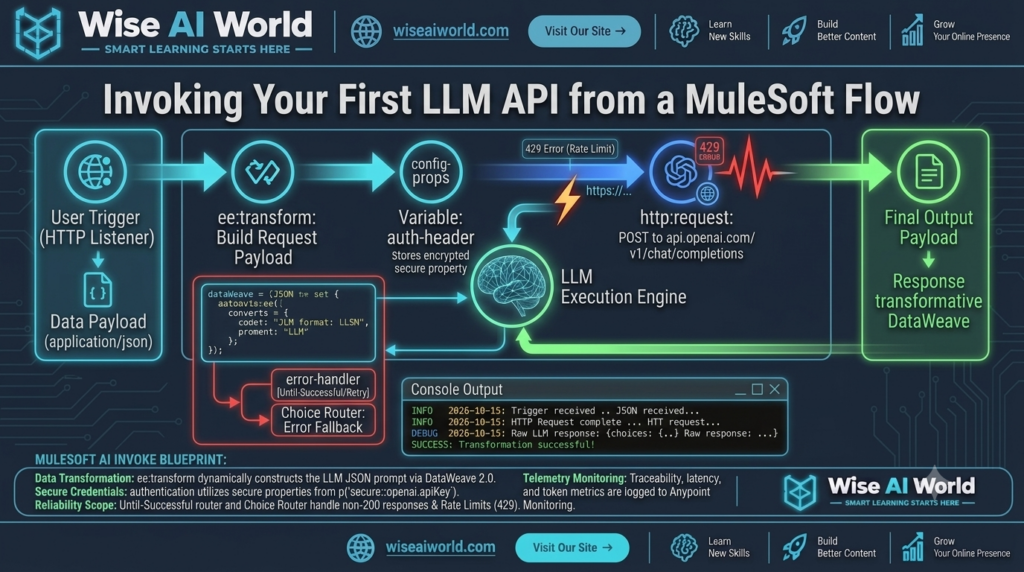
Architectural Execution Flow Diagram
Step-by-Step Implementation Guide
Step 1: Configure HTTP Listener and Global Configurations
Define the HTTP Listener to accept inbound REST calls on /api/v1/summarize and establish an HTTPS Request Configuration pointing to api.openai.com on port 443.
Step 2: Construct the Prompt via DataWeave 2.0
In the ee:transform component, map the incoming client JSON payload into the strict request schema required by the model. We enforce low sampling variance (temperature: 0.2) to ensure consistent, deterministic outputs.
%dw 2.0
output application/json
---
{
  "model": "gpt-4o",
  "temperature": 0.2,
  "max_tokens": 400,
  "messages": [
    {
      "role": "system",
      "content": "You are a specialized enterprise data summarizer. Extract top action items in clear bullet points."
    },
    {
      "role": "user",
      "content": payload.inputText default ""
    }
  ]
}
Step 3: Invoke the HTTP Request Connector
Configure the http:request connector to execute a POST operation to /v1/chat/completions. Pass the authorization header securely using MuleSoft’s property placeholder: "Bearer " ++ p('secure::openai.apiKey').
Step 4: Parse and Clean the LLM Response
The raw response from OpenAI returns metadata including choices, usage statistics, and execution IDs. Extract the message content cleanly for your API consumers using DataWeave 2.0:
%dw 2.0
output application/json
var choice = payload.choices[0]
---
{
  "status": "SUCCESS",
  "summary": choice.message.content,
  "finishReason": choice.finish_reason,
  "tokensUsed": {
    "promptTokens": payload.usage.prompt_tokens,
    "completionTokens": payload.usage.completion_tokens,
    "totalTokens": payload.usage.total_tokens
  },
  "processedAt": now()
}
Complete Production MuleSoft Flow (XML Code)
You can copy and paste the following flow configuration directly into your MuleSoft application XML file inside Anypoint Studio or Anypoint Code Builder:
<?xml version="1.0" encoding="UTF-8"?>
<mule xmlns:http="http://www.mulesoft.org/schema/mule/http"
      xmlns:ee="http://www.mulesoft.org/schema/mule/ee/core"
      xmlns="http://www.mulesoft.org/schema/mule/core"
      xmlns:doc="http://www.mulesoft.org/schema/mule/documentation"
      xmlns:xsi="http://www.w3.org/2001/XMLSchema-instance"
      xsi:schemaLocation="
        http://www.mulesoft.org/schema/mule/core http://www.mulesoft.org/schema/mule/core/current/mule.xsd
        http://www.mulesoft.org/schema/mule/http http://www.mulesoft.org/schema/mule/http/current/mule-http.xsd
        http://www.mulesoft.org/schema/mule/ee/core http://www.mulesoft.org/schema/mule/ee/core/current/mule-ee.xsd">

    <flow name="invoke-openai-llm-first-flow" doc:id="c3d4e5f6-003">
        <http:listener config-ref="HTTP_Listener_config" path="/api/v1/summarize" doc:name="POST /api/v1/summarize"/>

        <logger level="INFO" message="#['Received LLM invocation request for input text length: ' ++ sizeOf(payload.inputText default '')]" doc:name="Log Input"/>

        <!-- Step 1: Transform to OpenAI Request Schema -->
        <ee:transform doc:name="Build Chat Completion Request">
            <ee:message>
                <ee:set-payload><![CDATA[%dw 2.0
output application/json
---
{
  "model": "gpt-4o",
  "temperature": 0.2,
  "max_tokens": 500,
  "messages": [
    {
      "role": "system",
      "content": "You are an enterprise AI summarization assistant. Extract bullet point key takeaways."
    },
    {
      "role": "user",
      "content": payload.inputText default ""
    }
  ]
}]]></ee:set-payload>
            </ee:message>
        </ee:transform>

        <!-- Step 2: Send POST Request to OpenAI Endpoint -->
        <http:request method="POST" config-ref="OpenAI_HTTP_Request_Config" path="/v1/chat/completions" doc:name="HTTP POST /v1/chat/completions">
            <http:headers><![CDATA[#[{
                "Authorization" : "Bearer " ++ p('secure::openai.apiKey'),
                "Content-Type"  : "application/json"
            }]]></http:headers>
        </http:request>

        <!-- Step 3: Format Response Payload -->
        <ee:transform doc:name="Format Final JSON Output">
            <ee:message>
                <ee:set-payload><![CDATA[%dw 2.0
output application/json
---
{
  "status": "SUCCESS",
  "data": {
    "summary": payload.choices[0].message.content,
    "model": payload.model
  },
  "metrics": {
    "promptTokens": payload.usage.prompt_tokens,
    "completionTokens": payload.usage.completion_tokens,
    "totalTokens": payload.usage.total_tokens
  },
  "timestamp": now()
}]]></ee:set-payload>
            </ee:message>
        </ee:transform>

        <logger level="INFO" message="#['Successfully processed LLM request. Tokens used: ' ++ payload.metrics.totalTokens]" doc:name="Log Success"/>

        <!-- Step 4: Handle External Rate Limit Errors -->
        <error-handler>
            <on-error-propagate type="HTTP:TOO_MANY_REQUESTS" logException="true" doc:name="On 429 Rate Limit">
                <ee:transform doc:name="Format Rate Limit Error">
                    <ee:message>
                        <ee:set-payload><![CDATA[%dw 2.0
output application/json
---
{
  "status": "ERROR",
  "code": 429,
  "errorType": "RATE_LIMIT_EXCEEDED",
  "message": "The LLM provider rate limit was exceeded. Retry after cooling down."
}]]></ee:set-payload>
                    </ee:message>
                </ee:transform>
            </on-error-propagate>
        </error-handler>
    </flow>
</mule>
Verification & Testing via cURL
You can verify your flow locally by issuing the following cURL request in your terminal:
curl -X POST http://localhost:8081/api/v1/summarize \
  -H "Content-Type: application/json" \
  -d '{
    "inputText": "MuleSoft Anypoint Platform provides API-led connectivity to integrate applications, data, and devices. By encapsulating Generative AI APIs into governed Process APIs, enterprise architectures achieve decoupling, cost optimization, and secure credential handling."
  }'
Expected Successful Output:
{
  "status": "SUCCESS",
  "data": {
    "summary": "• MuleSoft Anypoint Platform enables API-led integration for apps, data, and devices.\n• Encapsulating AI APIs in Process APIs ensures structural decoupling.\n• Provides enhanced security, governance, and cost optimization.",
    "model": "gpt-4o-2024-05-13"
  },
  "metrics": {
    "promptTokens": 68,
    "completionTokens": 42,
    "totalTokens": 110
  },
  "timestamp": "2026-10-15T10:00:00Z"
}

Manish Prakash Dubey is an AI educator and technology writer based in India. He founded WiseAIWorld to make artificial intelligence simple and practical for students, professionals, and beginners. His work focuses on AI basics, machine learning, deep learning, NLP, computer vision, and real-world AI tools.
