When OpenAI launched ChatGPT in late 2022, Google found itself in an unusual position: the company that had pioneered the Transformer architecture underpinning modern large language models was being outpaced in the consumer AI race by a startup. The response was Google Gemini, a family of AI models and products that has grown rapidly since its launch in late 2023 and now represents one of the two dominant forces in generative AI alongside ChatGPT.
What Is Google Gemini?
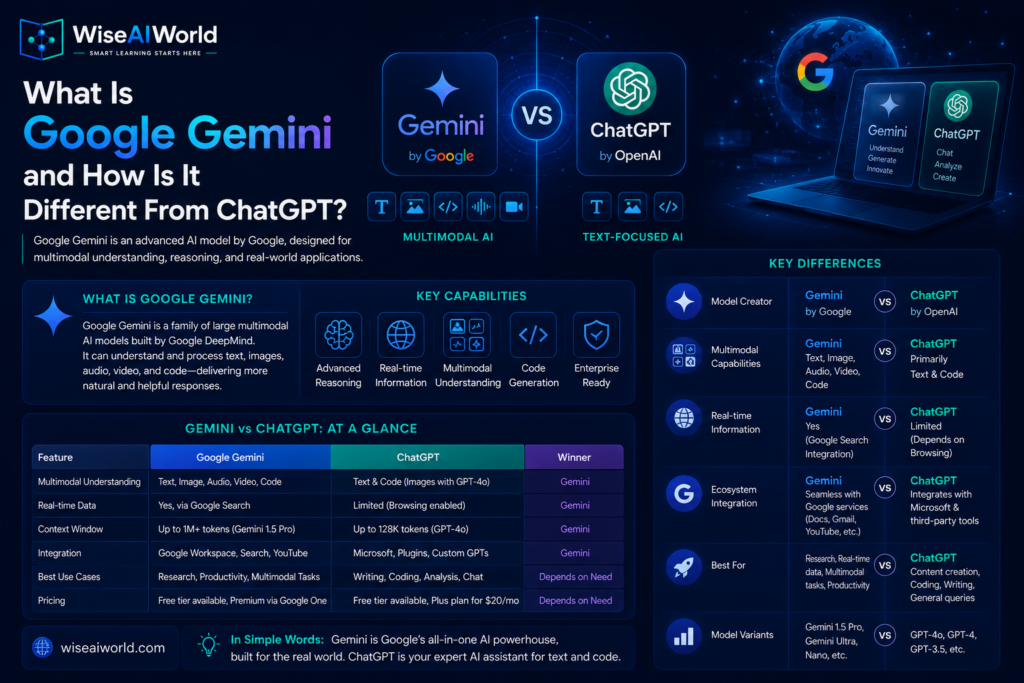
Google Gemini is both the name of Google’s family of large language models and the name of Google’s consumer AI assistant product built on those models. It was developed by Google DeepMind, the combined AI research organization formed when Google merged its Brain and DeepMind teams in 2023, and was built from the ground up to be multimodal, meaning it can process and reason about text, images, audio, video, and code simultaneously rather than treating each as a separate capability.
This is an important foundational distinction. Where was originally a text model that added image understanding and other capabilities over time, Gemini was designed from the start to handle multiple types of input natively. According to Neuronad, one of Gemini’s standout capabilities in 2026 is native video processing, allowing users to upload a video file or paste a YouTube link and have the model analyze its contents frame by frame with full audio transcription, a capability ChatGPT currently does not match.
How Large Is Google Gemini?
Gemini has grown remarkably quickly. According to Click Vision’s analysis of 70 verified Google Gemini statistics, Gemini reached 650 million monthly active users as of November 2025, a figure that does not include the additional 2 billion people who interact with Gemini through Google’s AI Overviews feature in Search. Over 1.5 million developers use Gemini models across Google tools.
Gemini’s market share in generative AI has grown from 5.7 percent to 21.5 percent in just 12 months, according to Click Vision, which describes this as the fastest market share expansion in the category’s history. Meanwhile, Google significantly improved the economics of the product, reducing Gemini’s serving costs by 78 percent in 2025, making the platform increasingly profitable as usage scales.
In terms of competitive positioning, according to SQ Magazine’s 2026 comparison, ChatGPT still leads with 900 million weekly active users versus Gemini’s 650 million monthly active users, but the gap has narrowed considerably and the two products are increasingly targeting different use cases rather than identical audiences.
The Gemini Model Family: Which Version Does What?
Gemini is not a single model but a family of models designed for different tasks and deployment contexts. Understanding which version does what helps you choose the right tool for your needs.
Gemini Nano
Gemini Nano is a lightweight model designed to run directly on mobile devices without requiring a cloud connection. It powers on-device AI features in Pixel phones and other Android devices, enabling capabilities like summarizing notifications, suggested replies, and smart recording transcription that work even without internet access. This is an example of edge AI, which you can read more about in our guide on .
Gemini Flash
Gemini Flash is Google’s efficiency-optimized model, designed to be fast and cost-effective for high-volume applications. It is the model used behind the scenes in many Google Workspace features and developer API integrations where speed and cost matter more than maximum capability.
Gemini Pro
Gemini Pro is the primary model available to standard users through the Gemini consumer product and to developers through the API. The latest version, Gemini 3.1 Pro, launched in February 2026, introduced a notable three-tier thinking system that lets users control how much computational effort the model applies to a problem, from quick responses on simple questions to deep reasoning mode for complex analysis. According to Neuronad, Gemini 3.1 Pro scores 77.1 percent on the ARC-AGI-2 benchmark compared to GPT-5.4’s 73.3 percent.
Gemini Ultra and Deep Think
Gemini Ultra is Google’s most powerful model tier, available through the Gemini Advanced subscription. Deep Think is a specialized version designed for scientific and engineering research tasks requiring the deepest level of reasoning. The Ultra tier is priced at 249.99 US dollars per month according to Click Vision, targeting power users and enterprises who need maximum context and advanced research features.
How to Access Google Gemini
Google has made Gemini available through several access points, which is a key part of its competitive strategy.
The free tier is available at gemini.google.com and provides access to Gemini Pro with generous daily limits. Unlike ChatGPT’s free tier, Gemini’s free version includes real-time Google Search integration by default, meaning its responses are grounded in current web information from the start.
Gemini Advanced is available through the Google One AI Premium plan at 19.99 US dollars per month, according to SQ Magazine, which also includes 2 terabytes of Google Drive storage and deep integration with Gmail and Google Docs.
For businesses using Google Workspace, Gemini for Google Workspace is available at 20 US dollars per user per month and integrates directly into Gmail, Docs, Sheets, Slides, and Meet with AI assistance built into each application. According to SEOProfy, 75 percent of daily Gemini for Google Workspace users report that the AI assistant improves the quality of their work.
What Gemini Is Particularly Good At
Google Workspace Integration
If you work primarily within Google’s ecosystem, Gemini’s integration advantage is significant. According to SEOProfy, in the first half of 2025 alone, Google users used Gemini’s generative AI features to edit over 1.4 billion Google Docs files. Gemini powers Gmail’s Smart Compose suggestions, increasing typing speed by 34 percent. Gemini supports Android Studio developers in 23 percent of code editing sessions. This depth of integration means Gemini often delivers more value to Google Workspace users without requiring them to switch between applications.
Real-Time Information
Gemini’s deep connection to Google Search gives it a structural advantage for questions involving current or frequently changing information. According to Sybill’s comprehensive comparison, Gemini tends to hallucinate less on factual, time-sensitive prompts because it draws heavily on Google’s search index. ChatGPT hallucinated more on real-time queries but showed greater consistency on timeless concepts and explanatory writing. This suggests Gemini is the stronger choice when you need current information, while ChatGPT may be more reliable for structured research and detailed explanations of established topics.
Multimodal Tasks Especially Video
Gemini’s native multimodal architecture gives it genuine advantages when working with visual and audio content. The ability to process video natively, including YouTube videos, and analyze images with greater contextual depth is a meaningful differentiator for users who regularly work with non-text content. According to Tech Insider’s nine-test comparison, this multimodal capability represents a clear strategic split between the two tools.
Coding
According to SEOProfy, Google Gemini can solve nearly 75 percent of Python functions compared to 45 percent for the previous generation PaLM 2 model. Gemini supports all major programming languages including Python, Java, and C++, and its integration into Android Studio has made it a significant productivity tool for Android developers in particular.
How Gemini Differs From ChatGPT: The Key Distinctions
The most useful way to compare these tools is not to declare an overall winner but to identify which is better suited to specific use cases.
For Google Workspace users, Gemini wins clearly. The integration into Gmail, Docs, Sheets, Slides, and Meet is deeper and more seamless than anything ChatGPT currently offers within Google’s ecosystem.
For real-time information needs, Gemini has a structural advantage through its Google Search connection, though both tools now offer web browsing capabilities.
For video analysis, Gemini leads because of native video processing. ChatGPT does not currently match this capability.
For creative writing, structured research, and detailed explanatory content, according to Sybill, ChatGPT tends to produce more consistent, structured outputs.
For computer use and desktop automation, ChatGPT’s computer use feature, which allows the AI to take direct control of your desktop to perform tasks, is currently more developed than Gemini’s equivalent.
For distribution and reach, Gemini has a unique advantage that no standalone AI product can match: it is embedded into Google Search, Android, Chrome, and the Google apps used by billions of people daily. Unlike ChatGPT, which requires users to visit a separate destination, Gemini meets users where they already are according to Click Vision.
Pricing Comparison in 2026
According to SQ Magazine, the consumer tiers of both products are priced within a dollar of each other: ChatGPT Plus at 20 US dollars per month versus Gemini Advanced at 19.99 US dollars per month. The key difference at this price point is what you get alongside the AI: Gemini Advanced includes 2 terabytes of Google One cloud storage, while ChatGPT Plus does not bundle storage.
At the high end, ChatGPT Pro at 200 US dollars per month has no direct Gemini equivalent, and the Gemini Ultra tier at 249.99 US dollars per month targets enterprise and research power users specifically. Both offer team and enterprise plans with custom pricing.
Key Takeaways
- Google Gemini is Google DeepMind’s family of AI models and consumer AI assistant, built from the ground up to be natively multimodal across text, images, audio, video, and code.
- Gemini reached 650 million monthly active users by November 2025, growing its market share from 5.7 percent to 21.5 percent in 12 months, the fastest expansion in the category.
- The model family includes Nano for on-device use, Flash for speed and efficiency, Pro for general use, and Ultra and Deep Think for advanced research.
- Gemini Advanced is priced at 19.99 US dollars per month and includes 2 terabytes of Google storage alongside AI access.
- Gemini outperforms ChatGPT for Google Workspace integration, real-time information, and native video processing.
- ChatGPT tends to be more consistent for structured research, creative writing, and desktop automation tasks.
Conclusion
Google Gemini and ChatGPT are not simply two versions of the same thing. They reflect different architectural philosophies, different distribution strategies, and different strengths that map onto different user needs. For someone deeply embedded in Google’s ecosystem of products, Gemini offers integration depth that is difficult to replicate elsewhere. For someone who values structured reasoning, creative writing quality, or desktop automation, ChatGPT currently holds an edge.
The most practical approach in 2026 is not to choose one tool permanently but to understand what each does best and use them accordingly. To complete your picture of the major AI tools available, read our guide on , which completes the picture of the three dominant AI assistants competing for your workflow in 2026.
Sources
- SQ Magazine: ChatGPT vs Google Gemini Statistics 2026
- Click Vision: 70 Verified Google Gemini Statistics 2026
- SEOProfy: Google Gemini Statistics 2026 Usage Growth and Performance
- Sybill: Gemini vs GPT Comprehensive Comparison Guide 2026
- Neuronad: ChatGPT vs Gemini 2026 Complete Comparison
- Tech Insider: ChatGPT vs Gemini 9 Tests 1 Clear Winner 2026

Manish Prakash Dubey is an AI educator and technology writer based in India. He founded WiseAIWorld to make artificial intelligence simple and practical for students, professionals, and beginners. His work focuses on AI basics, machine learning, deep learning, NLP, computer vision, and real-world AI tools.
