
Human vision is an astonishing biological achievement. In milliseconds, your eyes absorb reflected light photons, convert them into electrical impulses via the retina, and pass them to the visual cortex—allowing you to instantly recognize faces, estimate distances, read text, and navigate complex environments. For decades, teaching computers to perform this same visual synthesis was one of artificial intelligence’s most elusive challenges.
Today, Computer Vision (CV) has evolved from an academic curiosity into a foundational cornerstone of modern technology. It powers autonomous self-driving vehicles, medical diagnostic imaging, industrial quality inspection, facial biometric security, and generative AI vision models. But how do computers actually “see” a digital image composed strictly of numbers?
In this comprehensive, technical guide, we break down what Computer Vision is, how digital images are represented mathematically, the internal mechanics of Convolutional Neural Networks (CNNs) and Vision Transformers (ViTs), and how modern vision pipelines execute real-world tasks.
1. What Is Computer Vision? (The Mathematical Paradigm)
To understand Computer Vision, you must first unlearn how humans view photographs. A computer does not perceive shape, color depth, or emotional context directly. To a computer, an image is simply a multidimensional numerical matrix (or tensor).
A standard color digital image is represented as a 3D matrix with dimensions Height × Width × Channels:
- Height & Width: The spatial resolution of the image in pixels (e.g., 1920 × 1080).
- Color Channels (RGB): Three distinct 2D grids representing Red, Green, and Blue intensity values ranging from
0(pure black) to255(maximum intensity).
For example, a single 1080p color photograph consists of over 6 million individual integer values (1920 × 1080 × 3 = 6,220,800 numbers). The core objective of Computer Vision is to construct mathematical algorithms that can take these raw numerical matrices as input and output structured, semantic understanding (e.g., “There is a red delivery truck located at coordinates [X, Y]”).
2. How Computer Vision Works: Step-by-Step Pipeline
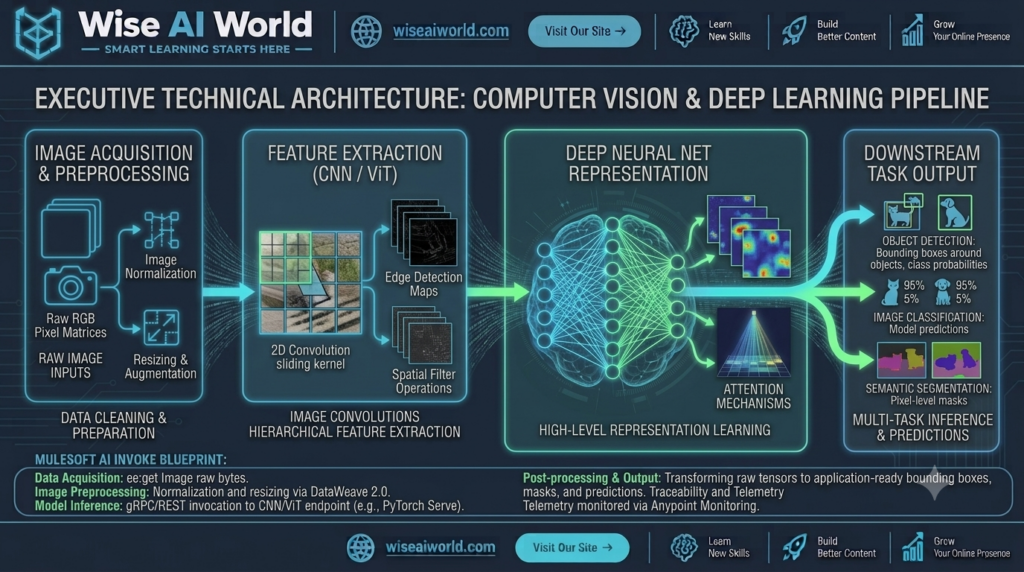
Modern Computer Vision systems rely on a structured, multi-stage processing pipeline to transform raw pixels into actionable insights.
Stage 1: Image Acquisition and Preprocessing
Before an image enters a neural network model, it must be cleaned and standardized. Raw sensor data from cameras often varies in resolution, lighting, and aspect ratio.
- Resizing & Cropping: Standardizing image dimensions (e.g., resizing all inputs to
224 × 224or640 × 640pixels) so they fit fixed neural network input tensor specs. - Pixel Normalization: Scaling integer values from
[0, 255]down to floating-point numbers between[0, 1]or[-1, 1]to stabilize mathematical gradient calculation during model training. - Data Augmentation: Artificially expanding training datasets by applying random rotations, horizontal flips, color jittering, and zoom adjustments—forcing the model to learn invariant features rather than memorizing exact pixel alignments.
Stage 2: Feature Extraction via Convolutional Kernels
In traditional computer vision (pre-2012), engineers had to manually design mathematical filters (like Sobel operators or Haar cascades) to detect edges and corners. Modern deep learning models learn these filters automatically through Convolutions.
A Convolutional Filter (or Kernel) is a small matrix of weights (typically 3×3 or 5×5) that slides across the input pixel grid. At each position, it performs element-wise multiplication followed by summation. This operation extracts spatial feature maps such as vertical edges, horizontal lines, color gradients, and textures.
Stage 3: Deep Neural Representation & Spatial Pooling
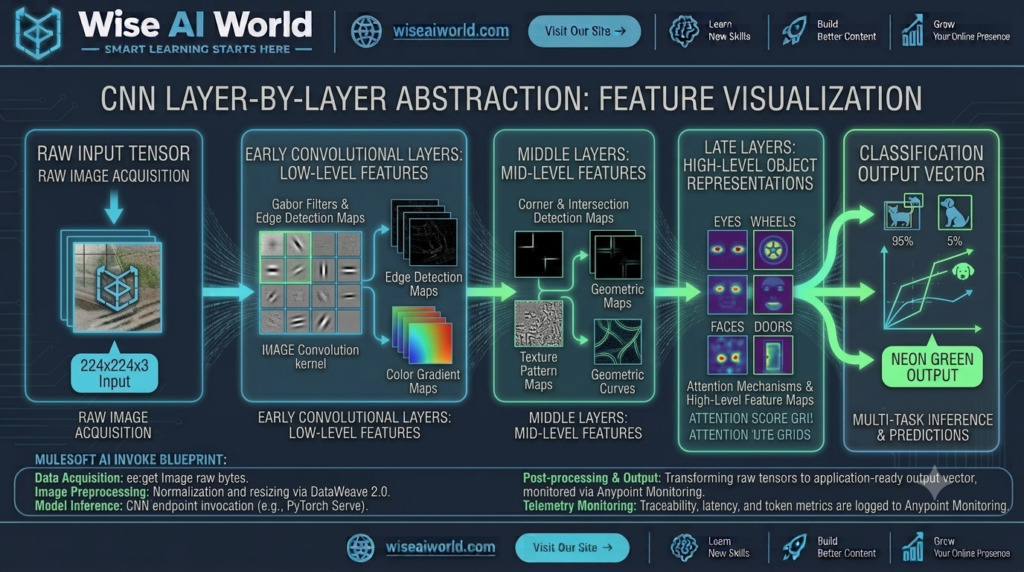
As features pass through deeper layers of a network, the model stacks simple concepts into complex semantic structures:
- Early Layers: Detect primitive features (edges, curves, color contrasts).
- Middle Layers: Combine edges to detect shapes, geometric corners, and surface textures.
- Deep Layers: Combine shapes to recognize entire object components (wheels, eyes, windows, doors).
- Pooling Operations (Max Pooling): Downsamples spatial map resolutions while preserving the most prominent features, making the model resistant to small translations or shifts in the image.
Stage 4: Task-Specific Output Heads
The final layers of the network flatten high-dimensional feature maps into dense vectors, passing them to task-specific output layers (e.g., Softmax functions for classification probabilities or regression heads for bounding box spatial coordinates).
3. Key Computer Vision Tasks & Capabilities
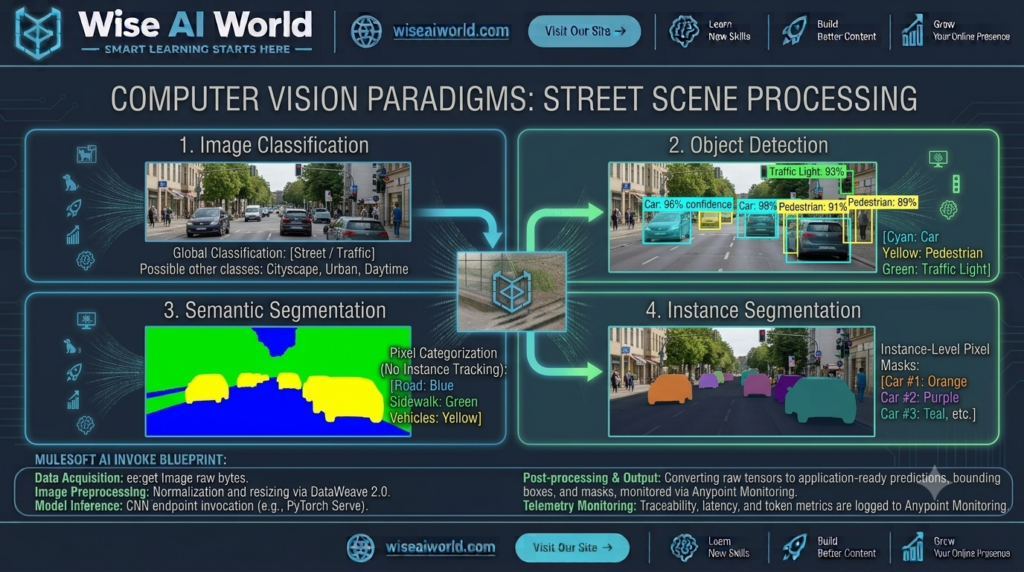
Computer vision is not a single task; it encompasses several distinct objective categories depending on the problem requirement.
| Task Category | What It Answers | Output Representation | Primary Real-World Use Case |
|---|---|---|---|
| Image Classification | “What is in this overall image?” | Single class label + confidence score | Photo tag classification, medical X-ray screening |
| Object Detection | “Where are specific objects located?” | Bounding boxes [X, Y, Width, Height] + labels | Autonomous driving, security camera tracking |
| Semantic Segmentation | “Which category does each individual pixel belong to?” | Pixel-level color-coded class mask | Drivable road space estimation, satellite crop mapping |
| Instance Segmentation | “Where is each distinct individual object?” | Separate pixel masks for each individual instance | Surgical robotics, automated warehouse sorting |
4. Hands-On Code: Building an Image Classifier in Python (PyTorch)
To see how a Convolutional Neural Network processes images in code, let us implement a complete Image Classifier using Python, PyTorch, and Torchvision. This script loads a pretrained ResNet-18 model, processes an input image, and outputs top class predictions.
import torch
import torchvision.transforms as transforms
from torchvision.models import resnet18, ResNet18_Weights
from PIL import Image
import json

# 1. Define Image Preprocessing Pipeline
transform_pipeline = transforms.Compose([
    transforms.Resize(256),                  # Resize shorter side to 256px
    transforms.CenterCrop(224),              # Crop center 224x224 square
    transforms.ToTensor(),                   # Convert PIL Image to PyTorch Tensor [C, H, W]
    transforms.Normalize(                    # Normalize with ImageNet mean/std
        mean=[0.485, 0.456, 0.406],
        std=[0.229, 0.224, 0.225]
    )
])

def classify_image(image_path: str):
    # 2. Load Pretrained ResNet-18 Model with Modern Weights Spec
    weights = ResNet18_Weights.DEFAULT
    model = resnet18(weights=weights)
    model.eval()  # Set model to evaluation mode

    # 3. Load and Preprocess Local Image File
    try:
        raw_image = Image.open(image_path).convert('RGB')
        input_tensor = transform_pipeline(raw_image)
        # Add batch dimension [1, 3, 224, 224]
        batch_tensor = input_tensor.unsqueeze(0)
    except Exception as e:
        print(f"Error loading image file: {e}")
        return

    # 4. Perform Forward Inference Pass
    with torch.no_grad():
        output_logits = model(batch_tensor)
        # Apply Softmax to obtain probability distribution
        probabilities = torch.nn.functional.softmax(output_logits[0], dim=0)

    # 5. Extract Top-3 Predicted Classes
    top3_prob, top3_catid = torch.topk(probabilities, 3)
    categories = weights.meta["categories"]

    print(f"\n--- Inference Results for: {image_path} ---")
    for i in range(top3_prob.size(0)):
        class_name = categories[top3_catid[i]]
        confidence = top3_prob[i].item() * 100
        print(f"Rank {i+1}: {class_name:<25} (Confidence: {confidence:.2f}%)")

if __name__ == "__main__":
    # Execute classification on sample image
    classify_image("sample_test_image.jpg")
5. Modern Frontiers: Vision Transformers (ViTs) and Multimodal AI
While Convolutional Neural Networks (CNNs) dominated computer vision for over a decade, two recent innovations have redefined the state-of-the-art:
1. Vision Transformers (ViTs)
Borrowed from Natural Language Processing, Vision Transformers (ViTs) treat image processing like language translation. An image is split into a grid of non-overlapping patches (e.g., 16×16 pixels). Each patch is flattened into a vector and processed using **Self-Attention mechanisms**.
Unlike CNNs, which process pixels locally through small sliding kernels, Vision Transformers evaluate global relationships across the entire image simultaneously from Layer 1—achieving superior accuracy on massive datasets.
2. Multimodal AI & Vision-Language Models (VLMs)
Modern frontier models (like GPT-4o, Gemini 1.5 Pro, and Claude 3.5 Sonnet) fuse computer vision directly with language understanding. These **Multimodal Vision Models** can analyze architectural blueprints, parse complex data charts into JSON tables, troubleshoot circuit board diagrams, and answer open-ended visual questions in real time.
6. Summary & Real-World Impact
Computer Vision has evolved from rigid, hand-crafted edge-detection scripts into deep, self-learning neural architectures capable of understanding high-level visual context across industries.
| Industry Domain | Computer Vision Application | Primary Technical Mechanism |
|---|---|---|
| Automotive & Mobility | Autonomous driving, lane assistance, pedestrian collision warning | Real-time Object Detection & 3D LiDAR Depth Fusion |
| Healthcare & Medicine | Early tumor segmentation in MRI scans, automated cell counting | 3D U-Net Semantic Segmentation Architecture |
| Retail & Logistics | Automated checkout-free stores, barcode scanning, inventory tracking | Multi-camera Instance Tracking & Pose Estimation |

Manish Prakash Dubey is an AI educator and technology writer based in India. He founded WiseAIWorld to make artificial intelligence simple and practical for students, professionals, and beginners. His work focuses on AI basics, machine learning, deep learning, NLP, computer vision, and real-world AI tools.
