In 2022, an AI-generated artwork won first place at the Colorado State Fair’s fine arts competition. The artist had entered a piece created using Midjourney, an AI image generation tool, and the win sparked a global debate about creativity, authorship, and the future of visual art. Less than four years later, that debate has not been resolved, but the technology has become so mainstream that it no longer shocks anyone.
Today, approximately 80 million AI images are generated every single day according to Imagera AI, by over 150 million monthly users across every industry from marketing and e-commerce to healthcare, architecture, and education. Understanding what AI image generation is, how it actually works, and what the leading tools offer has become a genuinely useful piece of knowledge for anyone working with visual content in 2026.
What Is AI Image Generation?
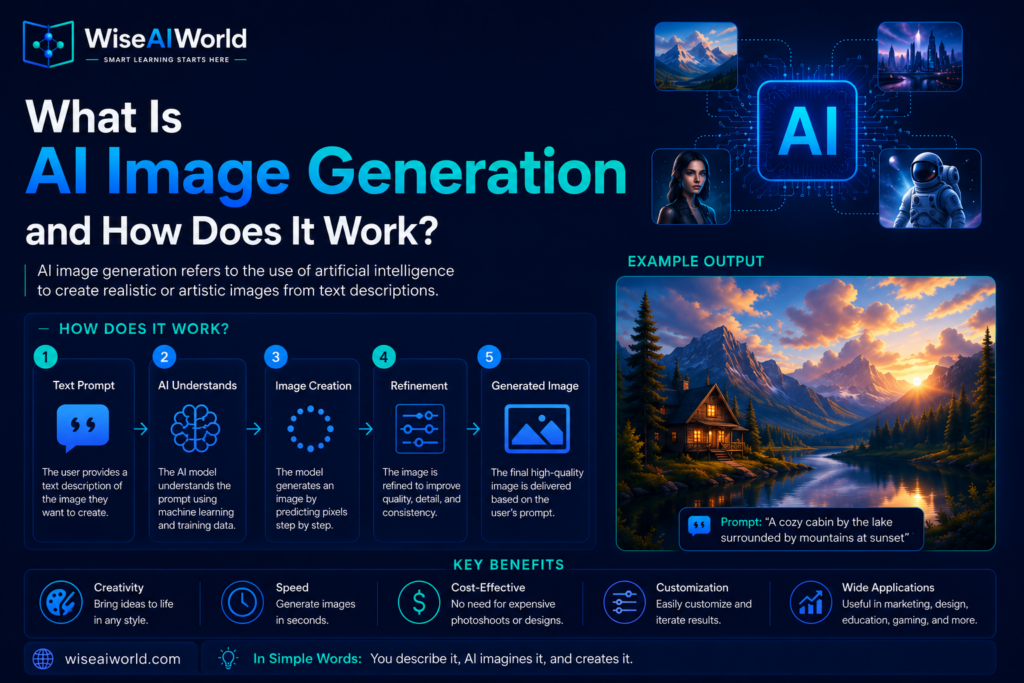
AI image generation is the process of creating visual content, including photographs, illustrations, artwork, product images, and more, using models trained on large datasets of existing images. The user typically provides a text description, called a prompt, and the AI generates an image matching that description. Some systems also allow image-to-image generation, where you provide an existing image and ask the AI to modify, extend, or reimagine it.
The scale of adoption reflects how quickly this technology has moved from research curiosity to commercial tool. According to AI Video Bootcamp, the global AI image generator market grew from 11.65 billion US dollars in 2025 to 15.18 billion US dollars in 2026, a 30.3 percent year-over-year increase that makes image generation the largest standalone segment in generative media. The broader AI-powered image generation tool market is projected to reach 272.8 billion US dollars by 2035, growing from 9.1 billion US dollars in 2025 at a compound annual growth rate of 40.5 percent, according to Market.us. To put this in perspective, the entire global photography services market was valued at 44 billion US dollars in 2023. AI image generation is on track to exceed the industry it is disrupting.
How Does AI Image Generation Work?
There are two main technical approaches that power modern AI image generation tools, and understanding both helps you make sense of what these systems can and cannot do.
Diffusion Models
Diffusion models are the dominant architecture behind most major AI image generation tools in 2026, including DALL-E, Stable Diffusion, Adobe Firefly, and Midjourney. They work through a process that involves two phases: forward diffusion and reverse diffusion.
In forward diffusion, the training process gradually adds random noise to thousands of real images, step by step, until they become completely unrecognizable static. The model learns to predict, at each step, what the original image looked like before that level of noise was added.
In reverse diffusion, which is what happens when you generate a new image, the model starts with a completely random grid of noise and then applies what it learned in reverse, progressively removing noise step by step, guided by your text prompt, until a coherent image emerges. The text prompt acts as a steering signal at each step, pushing the denoising process toward visual features associated with the words in your description.
The result is a system that can generate extraordinarily diverse and detailed images because it has learned to navigate an enormous space of visual possibilities, guided by language, rather than simply retrieving or combining stored images.
Generative Adversarial Networks
An earlier approach called Generative Adversarial Networks, or GANs, uses two neural networks competing against each other. One network, the generator, creates images. Another network, the discriminator, tries to tell whether each image is real or AI-generated. The generator learns to produce increasingly convincing images by trying to fool the discriminator, while the discriminator gets better at spotting fakes, pushing the generator to improve further. While GANs were dominant until around 2022, diffusion models have largely superseded them for image generation quality and versatility, though GANs still appear in some specialized applications.
How Text Prompts Control Image Generation
The text prompt is your primary interface with an AI image generator. The model uses to interpret your prompt and translate it into guidance for the image generation process.
A simple prompt like “a cat sitting on a windowsill” will produce a generic result. A more detailed prompt like “a fluffy orange tabby cat sitting on a wooden windowsill at golden hour, looking out at a rainy street below, photorealistic, shallow depth of field, warm light” gives the model much more specific guidance and produces a correspondingly more detailed and intentional result.
Experienced users of AI image tools develop what is sometimes called prompt engineering for images, learning which descriptors consistently produce high-quality outputs, how to specify art styles, lighting conditions, camera angles, and compositional elements, and how to use negative prompts, descriptions of what you do not want in the image, to avoid common unwanted elements.
The Major AI Image Generation Tools in 2026
The AI image generation market has consolidated around a handful of dominant tools, each with distinct strengths and pricing models.
Midjourney
Midjourney leads the market with 26.8 percent global market share according to AutoFaceless, and is widely regarded as producing the most aesthetically impressive results, particularly for artistic and stylized imagery. It generated 500 million US dollars in revenue in 2025, a 66.7 percent increase from 300 million US dollars in 2024, achieved with no outside funding, no free tier, and a team of approximately 40 people, making it arguably the most capital-efficient AI company in the world according to AI Video Bootcamp. As of January 2026, Midjourney had approximately 19.83 million users, with daily active users ranging between 1.2 million and 2.5 million. It operates through a subscription model and is currently accessible via its website and Discord community.
DALL-E by OpenAI
DALL-E holds 24.4 percent market share and is integrated directly into , making it the most accessible image generation tool for the hundreds of millions of ChatGPT users worldwide. DALL-E tends to excel at generating images that closely follow specific textual instructions, making it particularly useful for scenarios where precise adherence to a description matters more than artistic style.
Stable Diffusion
Stable Diffusion is an open-source model that, while holding only 15.1 percent direct market share by brand, is responsible for approximately 80 percent of all AI-generated images worldwide according to SQ Magazine, with approximately 12.59 billion cumulative images attributed to its open-source ecosystem. Its open architecture has enabled thousands of derivative tools, custom fine-tuned models, and specialized applications, creating an ecosystem far larger than any single commercial platform.
Adobe Firefly
Adobe Firefly is designed specifically for commercial use and is trained exclusively on Adobe Stock images, openly licensed content, and public domain material. According to SQ Magazine, Adobe Firefly users have generated 24 billion assets since the platform’s launch, with the cumulative count adding two billion new assets in roughly two months by mid-2025. Its commercial safety positioning, meaning generated images can generally be used in commercial projects without copyright concerns, makes it particularly valuable for marketing and design professionals.
Real-World Applications of AI Image Generation
Marketing and Advertising
Marketing and advertising account for over 36 percent of AI image generation use according to Market.us, with 62 percent of marketers using generative AI for image creation. AI image tools allow marketing teams to produce custom visuals for campaigns, social media, and advertising at a fraction of the cost and time of traditional photography or illustration.
E-Commerce Product Images
Retailers use AI image generation to create product visualizations, lifestyle scenes, and variant images at scale. E-commerce and retail adoption is growing at 39 percent annually according to Market.us, with AI tools saving e-commerce teams an average of 6.4 hours per week. Major retailers now use AI to generate thousands of product images showing items in different colors, settings, and contexts without requiring separate photoshoots for each variation.
Architecture and Product Design
Architects and product designers use AI image generation to create concept visualizations, explore design variations, and present ideas to clients before committing to detailed technical drawings. The ability to generate photorealistic renderings from a text description in seconds rather than hours dramatically accelerates the early design exploration phase.
Entertainment and Media
Film production, video game development, book publishing, and other creative industries use AI image generation for concept art, storyboards, asset creation, and visual development. Read more about how this is transforming one specific industry in our article on .
The Copyright and Ethical Questions
AI image generation raises genuine ethical and legal questions that are actively being debated and litigated in 2026. The core issue is that these models are trained on enormous datasets of existing images scraped from the internet, and many artists and photographers argue that their work was used without permission or compensation to train systems that now compete with them commercially.
Copyright law in most jurisdictions has not kept pace with these developments, and the legal status of both training data use and AI-generated outputs remains unsettled in many countries. Adobe Firefly’s approach of training exclusively on licensed and public domain content is one response to these concerns, and some platforms now offer indemnification for commercial use of their generated images.
A separate concern is the use of AI image generation for deceptive purposes. According to Imagera AI, human ability to distinguish AI-generated images from real photographs has dropped to just 38 percent accuracy, below the 50 percent chance threshold, according to a 2025 study published in Science. This makes AI-generated misinformation and deepfakes a serious and growing concern. You can read more about these issues in our article on .
Key Takeaways
- AI image generation creates visual content from text descriptions using deep learning models, primarily diffusion models, trained on large datasets of images paired with text.
- Approximately 80 million AI images are generated every day in 2026, by over 150 million monthly users across all platforms.
- The global AI image generator market reached 15.18 billion US dollars in 2026 and is projected to reach 272.8 billion US dollars by 2035.
- Midjourney leads with 26.8 percent market share and 500 million US dollars in 2025 revenue. Stable Diffusion’s open-source ecosystem accounts for approximately 80 percent of all AI-generated images worldwide.
- Major applications include marketing and advertising, e-commerce product images, architecture and design visualization, and entertainment media production.
- Human ability to spot AI-generated images has dropped to 38 percent accuracy, raising serious concerns about misinformation, deepfakes, and the integrity of visual content online.
Conclusion
AI image generation has moved from a novelty that sparked controversy at a state fair in 2022 to a multi-billion dollar industry reshaping how visual content is created across virtually every sector. The technology works by learning statistical patterns between language and visual features from enormous datasets, then applying those patterns in reverse to generate new images guided by text descriptions.
Understanding how it works, which tools are available, and what the genuine ethical and legal questions are gives you the foundation to use these tools effectively and responsibly. To continue exploring AI tools, read our guides on and .
Sources
- Imagera AI: AI Image Generation Statistics 2026
- AI Video Bootcamp: 60 Generative AI Statistics for Image Video and Audio 2026
- SQ Magazine: AI Image Generation Statistics 2026 Market Size and Adoption
- AutoFaceless: AI Image Generation Statistics 2026 Market Growth and Creative Industry Impact
- Market.us: AI Powered Image Generation Tool Market Size 2026
- Fortune Business Insights: AI Image Generator Market Size and Share

Manish Prakash Dubey is an AI educator and technology writer based in India. He founded WiseAIWorld to make artificial intelligence simple and practical for students, professionals, and beginners. His work focuses on AI basics, machine learning, deep learning, NLP, computer vision, and real-world AI tools.
