
In enterprise automation, API failures, schema drifts, rate limits, and unhandled data exceptions are inevitable. Traditional automation workflows rely on rigid, deterministic logic: when a single step fails, the entire scenario halts, requiring manual intervention, IT support tickets, and unnecessary operational downtime.
A Self-Healing Automation Workflow fundamentally changes this dynamic. By integrating router-based error handlers with Large Language Models (LLMs) inside Make.com, you can build autonomous pipelines capable of detecting execution failures, diagnosing root causes, generating real-time data fixes, and retrying failed operations without human oversight.
In this technical guide, we will walk through the exact architecture, module setup, error-handling directives, and AI fallback mechanisms required to deploy enterprise-grade self-healing workflows in Make.com.
1. What Is a Self-Healing Automation Workflow?
A self-healing workflow is an automated process designed with built-in observational and corrective feedback loops. Rather than failing outright when encountering an unexpected response, the scenario intercepts the error, passes the payload and error logs to an AI diagnostic engine, and applies dynamic remedies in real time.
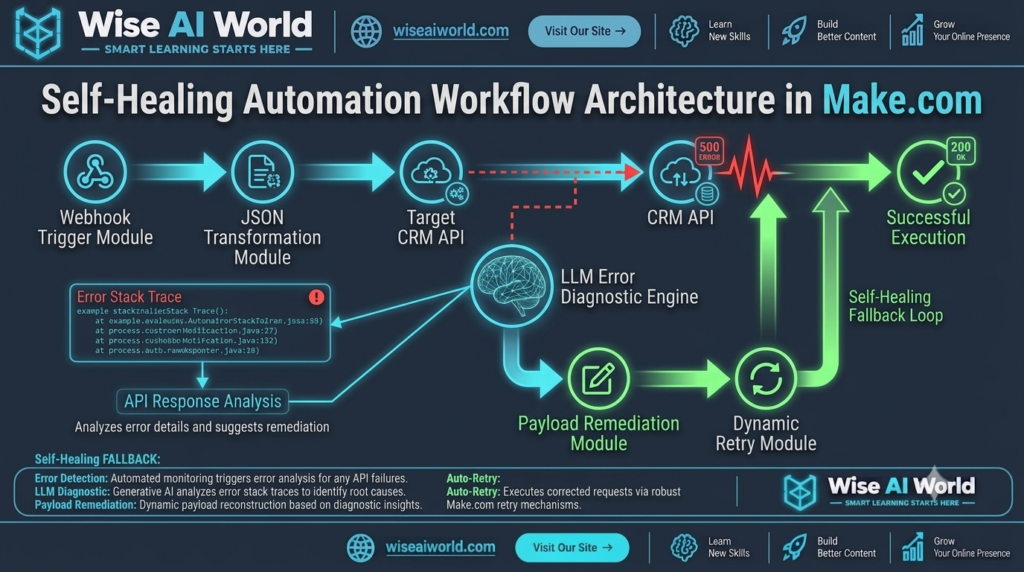
Traditional vs. Self-Healing Automation Architecture
| Architecture Feature | Traditional Make.com Scenario | Self-Healing AI Workflow |
|---|---|---|
| Failure Mode | Immediate scenario shutdown or ignored errors. | Intercepted via custom Error Handling routes. |
| Root Cause Analysis | Manual inspection of execution logs by engineers. | Automated stack-trace parsing via structured AI prompt. |
| Data Correction | Manual database edits and manual re-runs. | Dynamic payload remediation via JSON transformation. |
| Uptime & Reliability | Low (Vulnerable to external API rate limits & bad inputs). | High (Resilient execution with multi-tier fallback loops). |
2. Core Components of the Make.com Error-Handling Framework
Before implementing AI fallback engines, automation engineers must understand Make.com’s native error-handling directives. When a module encounters an execution error, Make.com offers five standard directives:
- 1. Rollback: Instantly stops scenario execution and reverts all prior operations within transactional modules.
- 2. Break: Stores the failed execution payload in the Incomplete Executions queue for manual or scheduled retry attempts.
- 3. Ignore: Omits the error completely and continues executing subsequent modules in the scenario path.
- 4. Resume: Replaces the failed output with a fallback mock object, allowing downstream modules to proceed normally.
- 5. Commit: Finalizes successful operations up to the failure point and stops scenario execution cleanly.
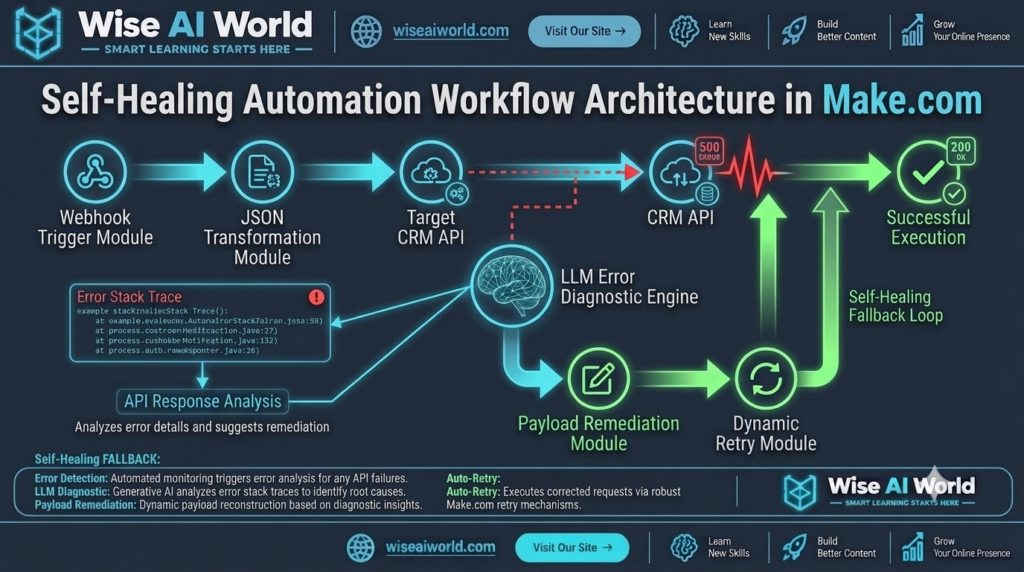
In a Self-Healing Scenario, we pair the Resume directive with a secondary branch router to capture raw exception stack traces and pipe them into an LLM for dynamic correction.
3. Step-by-Step Pipeline Construction in Make.com
Step 1: Setting Up the Primary Execution Branch
Build your standard business automation flow (e.g., fetching lead records from a Webhook, transforming JSON payload fields, and creating target records inside a CRM API like Salesforce or HubSpot).
Step 2: Attaching the Error Handler Route
Right-click the target API module (e.g., Salesforce: Create a Record) and select Add error handler. This creates a secondary route that activates exclusively when the primary module returns an HTTP 4xx or 5xx status code.
Step 3: Constructing the AI Diagnostic Prompt Module
Connect an OpenAI or Anthropic API module to the error route. Pass the raw error object (Error Type, Error Detail, and original Input Data Payload) into a structured JSON prompt:
SYSTEM PROMPT:
You are an expert MLOps error resolution engine.
Analyze the following JSON execution error stack trace and failed input payload.

Error Detail: {{1.error.detail}}
Error Type: {{1.error.type}}
Failed Input Payload: {{1.data}}

Your task:
1. Identify why the API rejected the payload (e.g., missing required fields, invalid date formatting, corrupted strings).
2. Output a corrected, valid JSON object ready for re-submission.
3. Return strict JSON format with keys: "diagnostic_summary", "corrected_payload", "can_auto_heal" (boolean).
Step 4: JSON Parsing & Dynamic Retry Execution
Pass the AI module output into a native JSON Parser. Attach a Filter block evaluating can_auto_heal = true. Route the corrected JSON payload directly into a secondary retry API module, ensuring business logic completes seamlessly without stopping scenario execution.
4. Production Deployment & Security Best Practices
When deploying autonomous self-healing scenarios in production environments, implement these architectural safeguards:
- Recursion Limits: Always maintain a maximum retry counter (e.g.,
retry_count <= 2) using Make.com Data Stores to prevent infinite execution loops and runaway API costs. - Payload Sanitization: Strip sensitive credentials, API tokens, and personally identifiable information (PII) before sending error logs to third-party AI endpoints.
- Human-in-the-Loop Escalation: If the AI model returns
can_auto_heal = false, fallback automatically to a Slack or Microsoft Teams notification module with direct links to the Make.com error log.
5. Summary & Self-Healing Decision Matrix
| Error Category | Typical HTTP Code | Self-Healing Strategy | Native Directive |
|---|---|---|---|
| Malformed Data / Schema Drift | 400 Bad Request | AI re-formats strings, fixes date types, fills default keys. | Resume + AI Router |
| Rate Limits & Throttle | 429 Too Many Requests | Exponential backoff delay module before dynamic retry. | Break / Sleep Route |
| Auth & Token Expiration | 401 Unauthorized | Trigger automated OAuth token refresh call and retry. | Resume + Auth Module |
Disclosure: WiseAIWorld independently tests and reviews automation platforms and MLOps tools. Some links on this site contain affiliate tracking links. If you sign up through our links, we may receive a small commission at no additional cost to you.

Manish Prakash Dubey is an AI educator and technology writer based in India. He founded WiseAIWorld to make artificial intelligence simple and practical for students, professionals, and beginners. His work focuses on AI basics, machine learning, deep learning, NLP, computer vision, and real-world AI tools.
